| View previous topic :: View next topic |
| Author |
Message |
Tikigod
Joined: 29 Mar 2005
Posts: 498
Location: United States
|
 Posted: Mon Mar 27, 2006 4:27 pm Post subject: Dynamic 3rd party Navigational Charts (Tutorial) |
 |
|
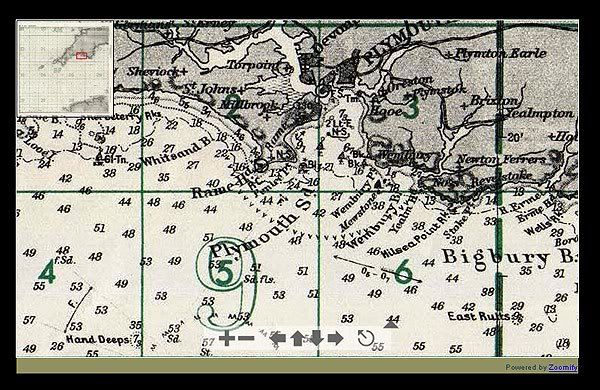
I have come across a program the other day that was pretty sweet. Its made by Zoomify. Basically it lets you to take hi-res images and make them zoomable and draggable in the macromedia flash player....so essentially you can make an entire reference manual of any data you want that can be viewed in a simple interface within any web browser. This is especially helpful for those that like to play sh3 in windowed mode.
This is what it looks like:
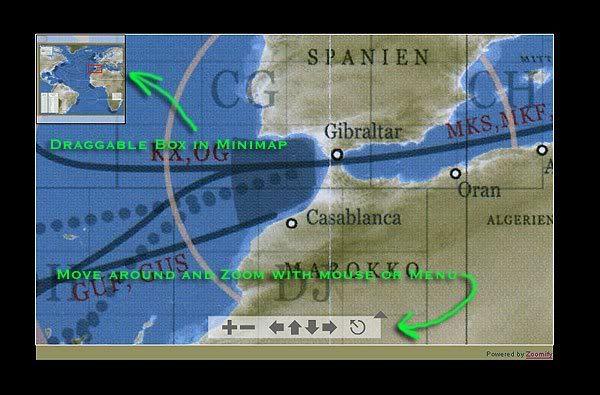

You can download and try a working version here:
http://www.subsim.com/phpBB/viewtopic.php?p=478321
I figured I would post a tutorial on how to use this application so that you can make your own navigational chart reference and post it here. The file sizes are pretty large since you are using hi-res images they can be up to 10-30 MB for each map depending on level of detail you want...but, there are ways to reduce this file size. I just figured I would make a tutorial since people have their own preference to what kind of maps they use during gameplay rather then post a bunch of maps they probably wouldn't want.
I started by assembling some of the hi-res charts found on http://u-boot.realsimulation.com/ (http://216.235.153.31/u-boot/SH3Charts/) for my own personal collection.
-------------------------------------------------------------------------------
Tutorial for Converting an Image in Zoomify EZ
--------------------------------------------------------------------------------
1) You will need an understanding of basic HTML and image editing program (like photoshop) to reduce the image size if its not in the format you want already.
2) You will need to download the Free Zoomifier EZ application at http://www.zoomify.com/
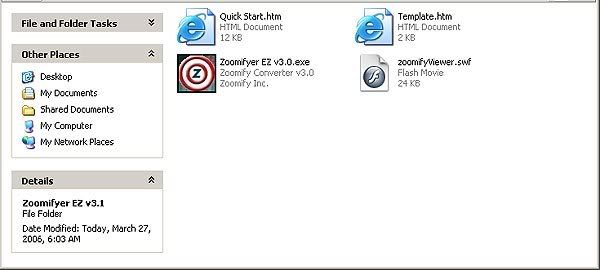
3) Next, you will extract the application to your desktop using winzip or winrar so it looks like this:
4) You will then need to convert the image you want to use to an standard image format. In this case pdf's could not be read by zoomify at least they didn't render fast enough so I converted the pdf to jpg format using photoshop. During this process you will want to make the image the size you want at its maximum zoomable distance (this is the closest you will be able to zoom in) Make sure you are viewing the image in 100% in order to see it in 1:1 scale to how you will see it in browser at its lowest level. While I am doing this I make sure the image is at 72 dpi and then save it to medium to low quality it order to reduce the filesize of the image even more. (This will usually bring a 30MB file down to 10MB or less) Since you are viewing these images on a monitor they do not need to be at the highest settings so adjust them to what you think looks best.
5) Once you have the image to size you want save it to desktop as jpg or other highly compressed file optimized for viewing on monitors (jpg and tga are usually standard for monitors whereas bmp should only be used when printing).
6) Now, you can drag your image onto the Zoomifyer EZ v3.0.exe image convertor like this:
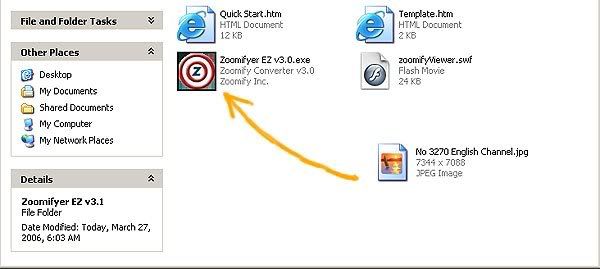
This will open a new window and break your image up into small tiles for the flash movie to reassemble and display when zooming.
The render window it opens will look liek this and takes about 30 seconds to a minute depending on size of the image:

This process will create a image folder named the same as the image file you dropped and will be ready to read once you edit your htm file.
7) Create a folder and name it whatever you want. I usually name it a description of the map then cut or copy the the image folder created by zoomify, the Template.htm, and zoomifyViewer.swf withing this folder as seen here:
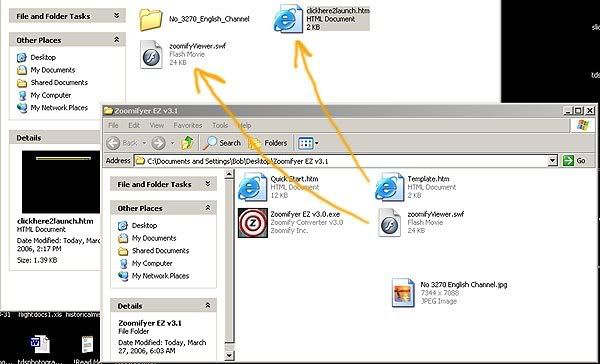
 Now open Template.htm in any text editor like notepad and set zoomifyImagePath to your image folder name created by zoomify. (make sure to use relative instead of absolute paths to make it easier to distribute to others if you decide to post it...otherwise someone will hit the htm file and not see the map render in the swf.)
Change these lines:
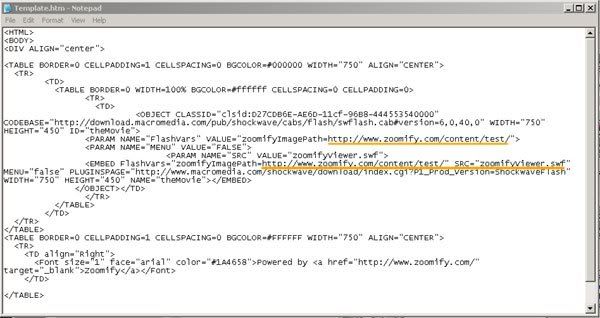
To somethign relative like this:
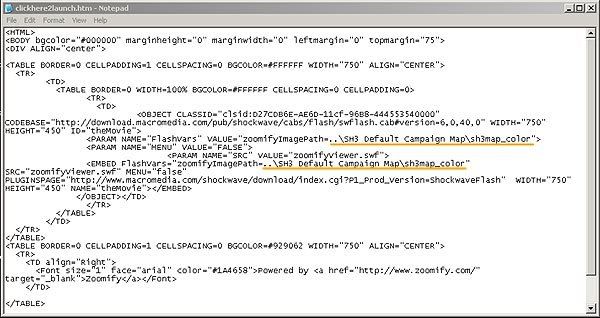
Once, you have the two lines edited you can save it. If you have HTML experience you can edit and design this page how you want it to look. I changed the background to black and probably will add links to other maps I create so I have a nice GUI. The only thing you can't change is the swf flash file itself. In order to do this you must buy the fla source etc. (which is what the company sells)
9) You can now launch the program by double clicking on the Template.htm file. It should open your webbrowser to a moveable and zoomable map that looks like this:
WOW! Isn't it cool?
10) (optional) You can post this on your Web server and make it a website along with your sh3 commander profile...or wherever you want to access and zoom the maps you create.
I hope this was helpful if not you can post questions or problems you may be having below.
Last edited by Tikigod on Mon Mar 27, 2006 7:29 pm; edited 1 time in total |
|
| Back to top |
|
 |
Kpt. Lehmann
Joined: 25 Jul 2005
Posts: 1665
Location: Texas, USA
|
| Posted: Mon Mar 27, 2006 5:39 pm Post subject: |
|
|

WICKED!!! |
|
| Back to top |
|
|
tbarak
Joined: 12 Mar 2006
Posts: 54
|
| Posted: Tue Mar 28, 2006 3:32 am Post subject: |
|
|
| Hey that's pretty cool. Thanks for the write-up. |
|
| Back to top |
|
|
terrapin
Joined: 30 Apr 2005
Posts: 815
|
|
| Back to top |
|
|
Kpt. Lehmann
Joined: 25 Jul 2005
Posts: 1665
Location: Texas, USA
|
| Posted: Tue Mar 28, 2006 1:42 pm Post subject: |
|
|
Even more WICKED!!! |
|
| Back to top |
|
|
|



