| View previous topic :: View next topic |
| Author |
Message |
Church SUBSIM
Joined: 19 Feb 2004
Posts: 257
|
 Posted: Mon Feb 13, 2006 12:22 am Post subject: Changing the Font for Radio Messages ... |
 |
|
anyone know how this is done? I would like to get rid of that hand writing.
Thanks,
Church |
|
| Back to top |
|
 |
tennozan
Joined: 09 May 2005
Posts: 39
|
| Posted: Tue Feb 14, 2006 4:04 pm Post subject: |
|
|
Well, I thought it was a good question anyway.  Maybe this will bump it right into the lap of someone who thinks so too but can actually answer the question. :8  |
|
| Back to top |
|
|
Tikigod
Joined: 29 Mar 2005
Posts: 498
Location: United States
|
| Posted: Tue Feb 14, 2006 5:22 pm Post subject: |
|
|
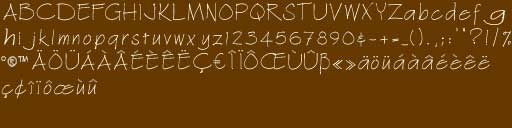
The font you are looking for is called FPArhi24.tga It is located in your: SilentHunterIII\data\Menu\Fonts folder....If you want to change this font you will need to find another font import it to photoshop or another editing program that handles tga files...then replace it manually. Make sure all the letters are aligned like the one you see in this file. Keep the text white and background clear save it as a tga with same file name and you should be good to go. Hardest part will be finding a font base that is alligned or that will need to be alligned to match the locations of letters in this file. The width dimensions of the image are 512x128 pixels and looks like this when you open it. (I made the background brown so you can see the letters)
 |
|
| Back to top |
|
|
Tikigod
Joined: 29 Mar 2005
Posts: 498
Location: United States
|
|
| Back to top |
|
|
Church SUBSIM
Joined: 19 Feb 2004
Posts: 257
|
| Posted: Tue Feb 14, 2006 7:10 pm Post subject: |
|
|
| Many thanks for the follow up! |
|
| Back to top |
|
|
JonZ
Joined: 06 Feb 2006
Posts: 702
Location: Montreal, Canada
|
| Posted: Mon Feb 27, 2006 9:26 pm Post subject: |
|
|
| I discovered that when editing the menu_1024x768.ini file, if you go to [G37 I2], [G37 I3] and [G37 I4], if you change font=10 to font=5, you get the same typewriter texts from the captain's log. A lot more easier on the eyes. |
|
| Back to top |
|
|
Church SUBSIM
Joined: 19 Feb 2004
Posts: 257
|
| Posted: Mon Feb 27, 2006 10:34 pm Post subject: |
|
|
JonZ .....
Someone take his picture .... I need to put it on my fridge and put a gold star on it! The perfect solution. Thanks! |
|
| Back to top |
|
|
MarkQuinn
Joined: 10 Feb 2006
Posts: 47
|
| Posted: Mon Feb 27, 2006 10:40 pm Post subject: |
|
|
Let me second that! Thank you JonZ, the new radio messages look beautiful. My radioman isn't too happy about my new policy on typing up all incoming reports, but I gave him the choice of that or working in the galley so his decision was clear. Anyway he's a terrible cook so it works out well for everyone.
MQ |
|
| Back to top |
|
|
JonZ
Joined: 06 Feb 2006
Posts: 702
Location: Montreal, Canada
|
| Posted: Mon Feb 27, 2006 11:23 pm Post subject: |
|
|
Hey guys, glad you liked it :sunny:
I've been messing in the ini file for quite days now and I was looking for some discussions then I saw this thread 
I'm starting to understand alot of things in that file and I will soon release cool mods  \ |
|
| Back to top |
|
|
Tikigod
Joined: 29 Mar 2005
Posts: 498
Location: United States
|
| Posted: Tue Feb 28, 2006 1:40 am Post subject: |
|
|
| oh sure....do the lazy fix....that's no fun....why don't you just slap a fancy name on it and release it to community. I'm sure they will go ape$#@! over it. haha |
|
| Back to top |
|
|
|



