| View previous topic :: View next topic |
| Author |
Message |
JonZ
Joined: 06 Feb 2006
Posts: 702
Location: Montreal, Canada
|
 Posted: Sat Feb 18, 2006 9:09 pm Post subject: BordInstrumente Scope Periscope correction mod |
 |
|
I was a little confused when I upgraded the Vanilla Periscope to the BordInstrumentale v1.0
the lights wouldn't show ON when selected. Just a pale gray mask overlay.
Well, no more! I spent my very cold Saturday of February to try to fix that.
Also fixed the 'clippings' on the Lock button, now the Lock button looks round!
Behold the new lights buttons!
- Just unZip, place the folder into the MODS folder for JSGME users and install over your BI1.0
- or just copy the Data Folder into the Data folder in the SH3 directory! (make backups first, as always!)
------------------------------------------------------------------
The design was made by the talented Oak-Groove - the thanks goes to him!
Also thanks to Mahrkiv to point me out that it had to be saved 32bits tga files x.X!
JonZ
Take it there:
http://rapidshare.de/files/13593149/Scope_Buttons_Corrections_for_Bordinstrumente_1.0-1.7.zip.html
Compare

LowContrast users will be also happy:

Last edited by JonZ on Sat Feb 18, 2006 10:56 pm; edited 2 times in total |
|
| Back to top |
|
 |
jimmie
Joined: 07 Apr 2005
Posts: 164
|
| Posted: Sat Feb 18, 2006 9:33 pm Post subject: |
|
|
thank you, you saved my time. 
BTW why the version sig 1.7? |
|
| Back to top |
|
|
JonZ
Joined: 06 Feb 2006
Posts: 702
Location: Montreal, Canada
|
| Posted: Sat Feb 18, 2006 9:36 pm Post subject: |
|
|
| jimmie wrote: | thank you, you saved my time.
BTW why the version sig 1.7? |
There's a BI version 1.7. But it only affect interiors of sub compartments and TDC screen fix.
This mod only Affect Periscope.tga file and fixed the TDC.tga to fix the clipping on the fire button 
To make short, it compatible with 1.0 to 1.7
Enjoy! |
|
| Back to top |
|
|
jimmie
Joined: 07 Apr 2005
Posts: 164
|
| Posted: Sat Feb 18, 2006 9:59 pm Post subject: |
|
|
| Is there version 1.7? I can't find it... |
|
| Back to top |
|
|
JonZ
Joined: 06 Feb 2006
Posts: 702
Location: Montreal, Canada
|
|
| Back to top |
|
|
Church SUBSIM
Joined: 19 Feb 2004
Posts: 257
|
| Posted: Sat Feb 18, 2006 10:29 pm Post subject: |
|
|
| Looks really nice! Great work! |
|
| Back to top |
|
|
Tikigod
Joined: 29 Mar 2005
Posts: 498
Location: United States
|
| Posted: Sat Feb 18, 2006 10:30 pm Post subject: |
|
|
| Can you make a version with a green selected light? instead of grey? I like the green scheme in the red low contrast scope...but I like having all the buttons the same color. I just think the selected tube should be like your brightest green one which looks really good. then the loaded tube as regular green and then empty tube as the dark almost black green. Does anyone know what the color scheme is on a real TDC? I can't even find a picture of one. |
|
| Back to top |
|
|
JonZ
Joined: 06 Feb 2006
Posts: 702
Location: Montreal, Canada
|
| Posted: Sat Feb 18, 2006 10:42 pm Post subject: |
|
|
| Tikigod wrote: | | Can you make a version with a green selected light? instead of grey? I like the green scheme in the red low contrast scope...but I like having all the buttons the same color. I just think the selected tube should be like your brightest green one which looks really good. then the loaded tube as regular green and then empty tube as the dark almost black green. Does anyone know what the color scheme is on a real TDC? I can't even find a picture of one. |
That is feasible. But for now I have other projects in hand, and I don't think I will have time to do 'custom jobs', unless a good amount of people requesting this  . I hope you understand what I mean :dead: |
|
| Back to top |
|
|
jimmie
Joined: 07 Apr 2005
Posts: 164
|
| Posted: Sat Feb 18, 2006 10:43 pm Post subject: |
|
|
Ok, I'm not trying to nit picky; it's not a big deal at all, so don't get me wrong, but it's probably it's yet 1.0.  The "7" is the extention part of 7z, of 7zip archive. Just FYI |
|
| Back to top |
|
|
kapitanfred
Joined: 14 Sep 2002
Posts: 129
Location: Somewhere in the Atlantic
|
| Posted: Sat Feb 18, 2006 10:48 pm Post subject: |
|
|
| It still is version 1.0 the "7" relates to 7zip file. Hence Bordinstrumente v1.07z |
|
| Back to top |
|
|
JonZ
Joined: 06 Feb 2006
Posts: 702
Location: Montreal, Canada
|
| Posted: Sat Feb 18, 2006 10:55 pm Post subject: |
|
|
LOL 
You are all right, sorry for the confusion!!! 
Im dislectic 
I tought the Oak's TDC fix and room update was a pack 1.7!
Correcting my first post 
Last edited by JonZ on Sat Feb 18, 2006 10:59 pm; edited 1 time in total |
|
| Back to top |
|
|
U-Schultz
Joined: 28 Mar 2005
Posts: 174
Location: North Atlantic
|
| Posted: Sat Feb 18, 2006 10:57 pm Post subject: |
|
|
Very nice work. The grey buttons were my one pet peeve for this otherwise great mod.
Thanks. |
|
| Back to top |
|
|
Tikigod
Joined: 29 Mar 2005
Posts: 498
Location: United States
|
| Posted: Sun Feb 19, 2006 5:57 am Post subject: |
|
|
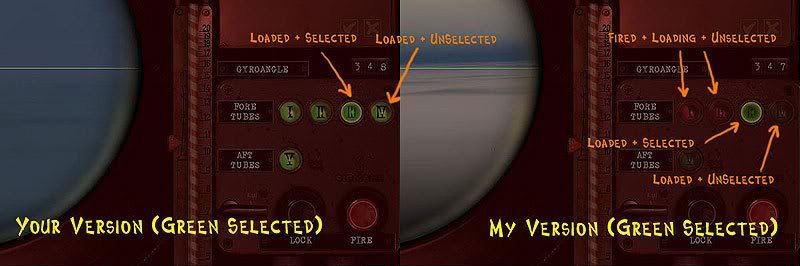
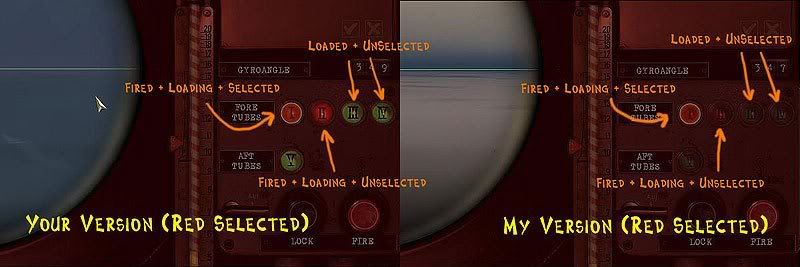
I figured out what it was....the low contrast version you have has really bright off buttons. The low contrast version of bordinstrumente has darker off buttons. So I took your fix and incorporated it with the original low contrast version. So you can have bright lights with the darker off buttons. Hope this makes sense.
Download:
http://rapidshare.de/files/13611792/BordInstrumente_Button_Fix_Low_Contrast_Dark_Buttons.rar.html
Examples:
Last edited by Tikigod on Sun Feb 19, 2006 6:56 am; edited 1 time in total |
|
| Back to top |
|
|
JonZ
Joined: 06 Feb 2006
Posts: 702
Location: Montreal, Canada
|
| Posted: Sun Feb 19, 2006 6:18 am Post subject: |
|
|
| Tikigod wrote: | I figured out what it was....the low contrast version you have has really bright off buttons. The low contrast version of bordinstrumente has darker off buttons. So I took your fix and incorporated it with the original low contrast version. So you can have bright lights with the darker off buttons. Hope this makes sense. I will post a screenshot soon.
Here is file for download incase someone wants bright lights (no gray) with the original darker buttons for low contrast version of bordinstrumente periscope:
http://rapidshare.de/files/13611792/BordInstrumente_Button_Fix_Low_Contrast_Dark_Buttons.rar.html |
cool |
|
| Back to top |
|
|
|



