| View previous topic :: View next topic |
| Author |
Message |
lucasade1
Joined: 09 Feb 2006
Posts: 10
|
 Posted: Thu Feb 09, 2006 11:18 am Post subject: Not Responding |
 |
|
I pre-ordered DW a few days ago, after 2 evenings of downloading it (via steam) I find it doesn't work!
When I try to open it, I get the first submenu click on play, the screen goes black then a black box appears in the top left and then I get a window telling me that it has encountered a problem and needs to close
Anyone else had this problem and sorted it out? |
|
| Back to top |
|
 |
sonar732
Joined: 03 Jul 2003
Posts: 1358
|
| Posted: Thu Feb 09, 2006 11:40 am Post subject: |
|
|
| Enable error logging so that you can view what happened and then post it here. |
|
| Back to top |
|
|
lucasade1
Joined: 09 Feb 2006
Posts: 10
|
| Posted: Thu Feb 09, 2006 11:46 am Post subject: |
|
|
| How do I do that? |
|
| Back to top |
|
|
lucasade1
Joined: 09 Feb 2006
Posts: 10
|
| Posted: Thu Feb 09, 2006 12:33 pm Post subject: |
|
|
| well? |
|
| Back to top |
|
|
Winston
Joined: 18 Aug 2003
Posts: 90
Location: Wales
|
|
| Back to top |
|
|
lucasade1
Joined: 09 Feb 2006
Posts: 10
|
| Posted: Thu Feb 09, 2006 1:31 pm Post subject: |
|
|
Thought that might work but no such luck  |
|
| Back to top |
|
|
Jamie
Joined: 07 Jul 2002
Posts: 779
Location: Waterford, CT (USA)
|
| Posted: Thu Feb 09, 2006 2:29 pm Post subject: |
|
|
What are your hardware specs, lucasade1? We need more information... 
| Quote: |
AppName: dangerouswaters.exe
AppVer: 0.1.0.3
ModName: d3d8.dll
ModVer: 5.3.2600.2180
offset: 00037bbb
All my machines are
Asus P4C800 deluxe
P4 3.0 GHz
1 GB mem
Fx5700s or 6600s w/ latest driver 81.98
plenty of HDD space
|
... and can you run the game in "windowed" mode? That will likely give you the crash error that we are looking for...
| Quote: |
i. Go to your Steam folder (i.e. C:\Program Files\Steam\SteamApps\lucasade1\dangerouswaters\) and find the dangerouswaters.ini file.
ii. Open dangerouswaters.ini in NotePad (or your preferred text editor).
iii. Scroll down a little ways and change:
[Graphics]
.RunInWindow No
to...
.RunInWindow Yes |
|
|
| Back to top |
|
|
lucasade1
Joined: 09 Feb 2006
Posts: 10
|
| Posted: Thu Feb 09, 2006 4:56 pm Post subject: |
|
|
Spec is:
AMD 3700 San Diego
2GB PC4000 Crucial BALLISTIX
7800GTX 256mb
I really doubt there is a problem with my spec 
Game version is 0.1.0.3
After trying to run in window mode I get an error message telling me that I need to run it in 16bit colour (was in 32bit). Change it to 16bit, and end up getting the same not responding error.
When you say the crash error I can give you the info from the error report windows gives, you know that usual send error report window. |
|
| Back to top |
|
|
lucasade1
Joined: 09 Feb 2006
Posts: 10
|
| Posted: Fri Feb 10, 2006 4:36 am Post subject: |
|
|
| well? Can anyone help? |
|
| Back to top |
|
|
sonar732
Joined: 03 Jul 2003
Posts: 1358
|
| Posted: Fri Feb 10, 2006 8:37 am Post subject: |
|
|
Either go to your control panel and double click on "system" or right click on "My Computer" and select properties.
Next, click on the "Advanced" tab and you'll see error reporting on the bottom. Make sure that the "Enable error reporting" bullet is selected and then put a check mark in Programs. Finally, check Dangerous Waters.  |
|
| Back to top |
|
|
Bellman
Joined: 14 Feb 2004
Posts: 1724
|
| Posted: Fri Feb 10, 2006 9:24 am Post subject: |
|
|
lucasade1 - hang on in their buddy. We have all been through frustrating start-ups with many games.
If you dont think you have a hardware problem then I would go through a dance like this-
1. Use End-it-all to eliminate any software conflicts. Shut down everything it permits. See if DW runs ok and/or -
2. Go into dxdiag audio and turn off hardware acceleration. and/or
3. This worked for me with similar DW instal prob. - I uninstalled my Anti-Virus/Firewall and A.N.Other security
software suite. I uninstalled DW and did a reinstall - hey presto it worked fine. So one by one I put the security
stuff back on and at the end of the day they all accepted DW in situ and worked together..................
I know it was A.N.Other (cant go into detail)
Give it a roll - good luck.
Last edited by Bellman on Fri Feb 10, 2006 12:14 pm; edited 1 time in total |
|
| Back to top |
|
|
Jamie
Joined: 07 Jul 2002
Posts: 779
Location: Waterford, CT (USA)
|
| Posted: Fri Feb 10, 2006 11:55 am Post subject: |
|
|
I agree, there definitely does not seem to be anything wrong with your hardware config (great video card! ) .
What type of sound card do you have?
| lucasade1 wrote: | | When you say the crash error I can give you the info from the error report windows gives, you know that usual send error report window. |
When the games crashes does it give you an additional information?
Something like this:
AppName: dangerouswaters.exe AppVer: 0.1.0.0 ModName: pilot.dll
ModVer: 0.1.0.0 Offset: 0000709d
It actually looks like this (when you click for "More information/Additional Details" on the Windows crash dialogue box):
 |
|
| Back to top |
|
|
lucasade1
Joined: 09 Feb 2006
Posts: 10
|
| Posted: Fri Feb 10, 2006 1:19 pm Post subject: |
|
|
| Bellman wrote: | lucasade1 - hang on in their buddy. We have all been through frustrating start-ups with many games.
If you dont think you have a hardware problem then I would go through a dance like this-
1. Use End-it-all to eliminate any software conflicts. Shut down everything it permits. See if DW runs ok and/or -
2. Go into dxdiag audio and turn off hardware acceleration. and/or
3. This worked for me with similar DW instal prob. - I uninstalled my Anti-Virus/Firewall and A.N.Other security
software suite. I uninstalled DW and did a reinstall - hey presto it worked fine. So one by one I put the security
stuff back on and at the end of the day they all accepted DW in situ and worked together..................
I know it was A.N.Other (cant go into detail)
Give it a roll - good luck. |
So basically get rid of all the things that are running and not needed? And try a re-install? I think it might come to this.
| Bellman wrote: | I agree, there definitely does not seem to be anything wrong with your hardware config (great video card! ) .
What type of sound card do you have?
|
Thanks, I like the card a lot 
The Sound card is the Sound Audigy 2 ZS
Now I know what you mean by error reports, this is what I get:
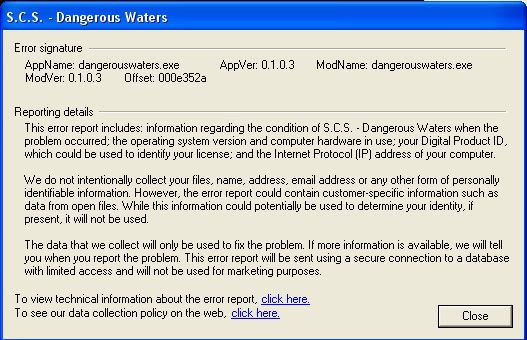 |
|
| Back to top |
|
|
Bellman
Joined: 14 Feb 2004
Posts: 1724
|
| Posted: Fri Feb 10, 2006 3:06 pm Post subject: |
|
|
 That last request was Jamies.
Suggestion 3 did it for me.
Some folk use Enditall every time they play some games - its the easiest option to try first. Then try the hardware one
and finaly (optimisticaly) 3.
This assumes that your rig and graphics perform well on other games. |
|
| Back to top |
|
|
lucasade1
Joined: 09 Feb 2006
Posts: 10
|
| Posted: Sat Feb 11, 2006 1:34 pm Post subject: |
|
|
Enditall doesn't work, neither does turning off hardware acceleration.
Can you get any info from the error window you lot wanted? |
|
| Back to top |
|
|
|



