| View previous topic :: View next topic |
| Author |
Message |
kiwi_2005
Joined: 23 May 2004
Posts: 1286
Location: New Zealand
|
 Posted: Wed Jan 11, 2006 8:24 pm Post subject: |
 |
|
This mod is a must have for those that dont have it yet. I just DL it and installed. Beautiful. 
You  OakGroove |
|
| Back to top |
|
 |
Viduka
Joined: 12 Oct 2005
Posts: 66
|
| Posted: Fri Jan 27, 2006 10:59 pm Post subject: |
|
|
Just installed this mod and must agree, it looks fantastic. Love the detail of the glass on the 2 scopes looking a bit dirty, adds to the realism.
GJ Oakgroove
A nice little screeny of the crew through the observation scope, while leaving port.
 |
|
| Back to top |
|
|
Viduka
Joined: 12 Oct 2005
Posts: 66
|
| Posted: Sat Jan 28, 2006 1:56 am Post subject: |
|
|
I seem to be having a problem with the speed dial fix. I've extracted it to the MODS folder but my dials are still showing the old 1.66 increments... :hmm:  Is the file still current? Clutching at straws here, am at a loss as to why it's not working. |
|
| Back to top |
|
|
Crop-Duster
Joined: 03 Apr 2005
Posts: 156
Location: Up the line in Canada eh
|
| Posted: Sat Jan 28, 2006 2:41 am Post subject: |
|
|
| Viduka wrote: | | I seem to be having a problem with the speed dial fix. I've extracted it to the MODS folder but my dials are still showing the old 1.66 increments... :hmm: Is the file still current? Clutching at straws here, am at a loss as to why it's not working. |
Make sure you over wrote the old .tga file
check your c:\SilentHunterIII\data\Menu\Gui\TDC folder to see if the extraction put it in a seperate folder within the above TDC folder
if it did cut and paste the file to the above directory.
Last edited by Crop-Duster on Sat Jan 28, 2006 5:34 am; edited 1 time in total |
|
| Back to top |
|
|
Viduka
Joined: 12 Oct 2005
Posts: 66
|
| Posted: Sat Jan 28, 2006 3:56 am Post subject: |
|
|
Thanks for the reply. It seems that the MENU folder was the one that needed to be overwritten and I hadn't extracted the folders containing the fix deep enough into the original directory.
Ended up using explorer to make sure I overwrote the correct folder and all seems to be working fine now. :8 |
|
| Back to top |
|
|
Viduka
Joined: 12 Oct 2005
Posts: 66
|
| Posted: Mon Feb 13, 2006 3:34 am Post subject: |
|
|
Just a query regarding the instrumentation, i'm not sure if this has been noticed/noted already, but within the TDC, when you first load up your game (new or saved) the dial for selecting the target bearing (the first dial bottom left in the TDC) starts off with the main needle exactly in the center, but after you've moved it, it's near impossible (if not impossible) to get it exactly lined up in the center (zero degrees, straight ahead) again if you are using manual targeting.
Having said that i'm not sure how much of an effect it has on manual targeting, it might be so minimal that it shouldn't really be a concern, but i'm curious nonetheless if there is a fix for this.
You can tell it's off center if you look at the small inner dial that's inside the main target bearing dial - at first it will have the 00 exactly in the middle, showing that it's lined up dead center but after the needle in the main dial has been moved once, the 00 will always be showing as either lined up slightly to the left or right of the center when you try to realign it to the middle again.
Apologies if the cause of this is my resolution or some other unforseen personal issue with how my PC is set up. Hope it doesn't sound like a whinge - I love this mod and think it's one of the best going around.
Cheers.
RC. |
|
| Back to top |
|
|
Redwine
Joined: 10 Jan 2002
Posts: 1143
Location: Buenos Aires , Argentina.
|
| Posted: Mon Feb 13, 2006 6:26 am Post subject: |
|
|
| Viduka wrote: | ...... you've moved it, it's near impossible (if not impossible) to get it exactly lined up in the center (zero degrees, straight ahead) again if you are using manual targeting.
Having said that i'm not sure how much of an effect it has on manual targeting, it might be so minimal that it shouldn't really be a concern, but i'm curious nonetheless if there is a fix for this.
You can tell it's off center if you look at the small inner dial that's inside the main target bearing dial - at first it will have the 00 exactly in the middle, showing that it's lined up dead center but after the needle in the main dial has been moved once, the 00 will always be showing as either lined up slightly to the left or right of the center when you try to realign it to the middle again.
Apologies if the cause of this is my resolution or some other unforseen personal issue with how my PC is set up. Hope it doesn't sound like a whinge - I love this mod and think it's one of the best going around.
Cheers.
RC. |
Yes ...noticed before, it is a "from the box" game bug.
If you try to adjust a 180 bearing the error is bigger even.
|
|
| Back to top |
|
|
Tikigod
Joined: 29 Mar 2005
Posts: 498
Location: United States
|
| Posted: Mon Feb 13, 2006 6:46 am Post subject: |
|
|
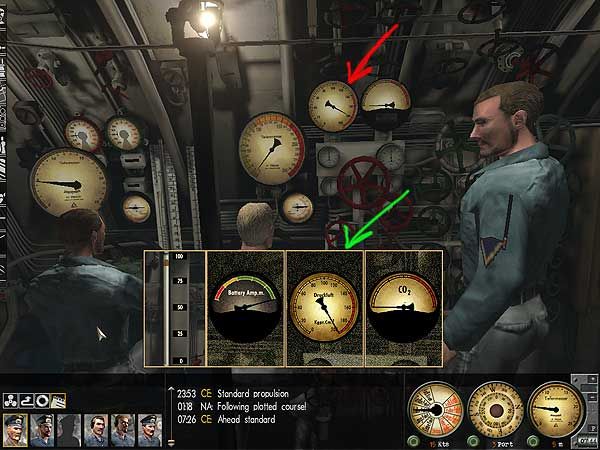
Does anyone know if there is a fix for the stock readout of the command room's air compressor gauge yet? The new gauges in this mod are awesome....I just wish ubi would fix this readout
 |
|
| Back to top |
|
|
Redwine
Joined: 10 Jan 2002
Posts: 1143
Location: Buenos Aires , Argentina.
|
| Posted: Mon Feb 13, 2006 7:34 am Post subject: |
|
|
I think so it is posible to fix, this problem is present at many places, in example there is difrerence in internal clocks, and salt water speedometers into some sub models.
I think so the way to fix it is the same way used by 400m Depth Gauge Mod.
You must to identify the instrument, it is the hard and dificoult part, and then edit its needle arc travel, same as 400M Depth Gauge Mod had done.
|
|
| Back to top |
|
|
Viduka
Joined: 12 Oct 2005
Posts: 66
|
| Posted: Wed Feb 15, 2006 12:15 am Post subject: |
|
|
| Redwine wrote: | | Viduka wrote: | ...... you've moved it, it's near impossible (if not impossible) to get it exactly lined up in the center (zero degrees, straight ahead) again if you are using manual targeting.
Having said that i'm not sure how much of an effect it has on manual targeting, it might be so minimal that it shouldn't really be a concern, but i'm curious nonetheless if there is a fix for this.
You can tell it's off center if you look at the small inner dial that's inside the main target bearing dial - at first it will have the 00 exactly in the middle, showing that it's lined up dead center but after the needle in the main dial has been moved once, the 00 will always be showing as either lined up slightly to the left or right of the center when you try to realign it to the middle again.
Apologies if the cause of this is my resolution or some other unforseen personal issue with how my PC is set up. Hope it doesn't sound like a whinge - I love this mod and think it's one of the best going around.
Cheers.
RC. |
Yes ...noticed before, it is a "from the box" game bug.
If you try to adjust a 180 bearing the error is bigger even.
|
Thanks for the reply.
Actually, I was playing last night and had no problems lining up the 180 degree mark at all and i've never noticed the problem I mentioned until I installed the bordinstrumente mod. |
|
| Back to top |
|
|
Drewie
Joined: 20 Mar 2005
Posts: 6
|
| Posted: Sat Feb 18, 2006 1:21 pm Post subject: |
|
|
| is it normal that i cant see the detailed instruments with the resolution fix? It works perfect with the 1024*768 standard setup, but on 1280*1024 I get blurry interior textures |
|
| Back to top |
|
|
jcwolf
Joined: 23 Jan 2006
Posts: 667
Location: Spain
|
| Posted: Fri Mar 03, 2006 11:40 pm Post subject: |
|
|
| OakGroove wrote: | The radio room detail addon is shaping up nicely, there will be a release later this evening with instructions on how to implement it using the DatTexExtract tool.
preview:
New wood

Radio room overview; Telefunken T3 PLLä 38 the most noticable improvement.

New CRT screen; closeup of T3 PLLä 38, the Radione has been retextured as well as labels in general.

GHG retextured
 |
Man been looking for that upgrade on the radio like in this oick, and can't find it guys, can anyone tell me where it is.... |
|
| Back to top |
|
|
Kpt. Lehmann
Joined: 25 Jul 2005
Posts: 1665
Location: Texas, USA
|
| Posted: Sat Mar 04, 2006 12:28 am Post subject: |
|
|
I spent a good deal of time looking for it too. It appears to me that it is maybe a little detail he forgot to add to the publicly available mod.
Sorry mate.  |
|
| Back to top |
|
|
Captain America
Joined: 20 Apr 2004
Posts: 144
Location: The Good Ole Red White & Blue
|
| Posted: Sat Mar 04, 2006 12:53 am Post subject: |
|
|
Guys, its listed as a download in his first post under updates named Radio and Sonar Room detail upgrade.
-CA |
|
| Back to top |
|
|
Kpt. Lehmann
Joined: 25 Jul 2005
Posts: 1665
Location: Texas, USA
|
| Posted: Sat Mar 04, 2006 1:54 am Post subject: |
|
|
ummm right... what I was referring to is the colored bands at the base of the radio frequency wheel.
I checked all of the downloads and the radio room upgrade.
It seems that it isn't present. |
|
| Back to top |
|
|
|



