| View previous topic :: View next topic |
| Author |
Message |
Seeadler
Joined: 14 Mar 2001
Posts: 1992
Location: Germany
|
 Posted: Sat Oct 22, 2005 6:43 am Post subject: |
 |
|
Here is an illustration on how it works in the SH3 3D Engine

The game world has two huge 3D domes (half of a sphere), there is a little gap
between the outer and inner dome. On the inner dome the cloud textures (nori00.tga and nori01.tga)
are mapped and on the outer dome the 128x128 textures tiles from the DATs in the \data\env\ folder.
These tiles are together blended, dependent on the time of day. The uvw map who tells the 3D engine
how to display the textures on these domes is stored in the 3D model of a dome.
| marhkimov wrote: |
may I ask what tool you are using to edit these meshes? |
3DSMax v5.1 |
|
| Back to top |
|
 |
Darkseed
Joined: 18 Oct 2003
Posts: 145
Location: Sweden
|
| Posted: Sat Oct 22, 2005 9:39 am Post subject: |
|
|
| I have those bands in the sky too, i'd guess they are caused by the same thing as the pixelated spots in the night sky as discussed at the end of this thread. |
|
| Back to top |
|
|
Seeadler
Joined: 14 Mar 2001
Posts: 1992
Location: Germany
|
| Posted: Sat Oct 22, 2005 5:29 pm Post subject: |
|
|
I had today the time to make a few tests. It does not seem to be necessary to adapt the mapping for the skydome if the textures are at 2048x1024.
If you create a user mission and set clouds to none, it will look fine. It is the clouddome who is in a kind of relationship with the size of the textures for the above skydome :hmm: |
|
| Back to top |
|
|
Marhkimov
Joined: 22 May 2005
Posts: 2392
Location: Bay Area, California, USA
|
| Posted: Sat Oct 22, 2005 5:42 pm Post subject: |
|
|
| Seeadler wrote: | I had today the time to make a few tests. It does not seem to be necessary to adapt the mapping for the skydome if the textures are at 2048x1024.
If you create a user mission and set clouds to none, it will look fine. It is the clouddome who is in a kind of relationship with the size of the textures for the above skydome :hmm: |
So are you saying that you were succesfully able to use a 2048x1024 sky texture?
That's strange because when i tried using the large textures, it didn't turn out so well (see the screenshots from my previous posts).
Where am I going wrong? |
|
| Back to top |
|
|
Flakwalker
Joined: 07 Aug 2005
Posts: 129
|
| Posted: Sat Oct 22, 2005 5:47 pm Post subject: |
|
|
| marhkimov wrote: | 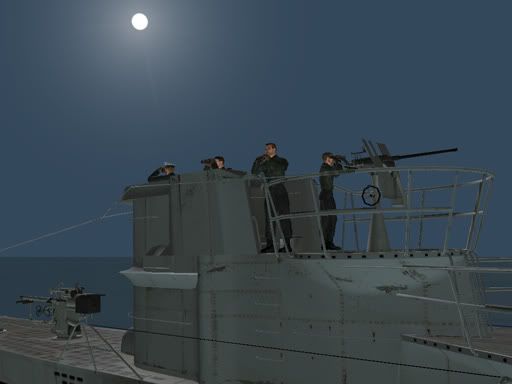 |
I like this effect 
I wonder if posible add the moon as a source of light at night |
|
| Back to top |
|
|
Marhkimov
Joined: 22 May 2005
Posts: 2392
Location: Bay Area, California, USA
|
| Posted: Sun Oct 23, 2005 1:06 pm Post subject: |
|
|
Seeadler, about your sky dome fix...
I attempted to import your sky dome model into the 16km visability fix, but things are not so smooth. Someone helped me out with this, but basically what we did was export the model from your scene.dat into the 16km scene.dat.
The problem is my men can still see ships up to 16km, but those ships aren't drawn in until 9.5km.
I'm guessing your dome model cuts off the visibility at 10km. I know you don't like meddling with other people's projects, but a model has to be made that is compatible with 16km, and you're the only one who knows how to do that... |
|
| Back to top |
|
|
Pablo
Joined: 17 Apr 2005
Posts: 148
|
| Posted: Sun Oct 23, 2005 7:13 pm Post subject: |
|
|
Seeadler,
Perhaps if you told us how you did it (i.e., which values need to be modified in which files) the conversions might proceed more quickly, with credit to you for discovering how to do it.
Pablo |
|
| Back to top |
|
|
Marhkimov
Joined: 22 May 2005
Posts: 2392
Location: Bay Area, California, USA
|
| Posted: Sun Oct 23, 2005 7:58 pm Post subject: |
|
|
Yeah, what Pablo said...
Right after I began using the altered version of your 'scene' file, I thought that everything was working correctly, but then I noticed that ships were invisible from beyond 10km.
Seeadler, I'm going to take a wild guess that this is a really simple problem for you to fix... but what will be simple for you won't be simple for everyone else... |
|
| Back to top |
|
|
Reece
Joined: 08 Sep 2003
Posts: 467
Location: Australia
|
| Posted: Sun Oct 23, 2005 11:27 pm Post subject: |
|
|
Marhkimov, I noticed you mentioned: "same shot but edited (brightness -25, contrast +60):" Which file & line is this edited?
Many Thanks.
Reece. |
|
| Back to top |
|
|
Seeadler
Joined: 14 Mar 2001
Posts: 1992
Location: Germany
|
| Posted: Mon Oct 24, 2005 6:08 am Post subject: |
|
|
| Pablo wrote: | Seeadler,
Perhaps if you told us how you did it (i.e., which values need to be modified in which files) |
I modified no values, as already said before it is the original scene.dat file only with adjusted uvw map for the cloud.obj. The steps are described here:
| Seeadler wrote: |
LOL, the solution for this fix was more easier than I estimate before!
The bug was not in the 3D structure of of the skydome, it was in the texture mapping coordinates. The developers do the unwrap job for the cloud's texture carelessly.
Here is the uvw map of the original cloud dome, in the center you recognizes that the coordinates are disordered and that results in the game in this well known distortion above.

I arranged only these coordinates in the center and brought them into a more ordered coordinate system and now there is no more distortion in the clouds and they move well over the sky.

I release the next days a fixed scene.dat. Modders who use the original scene.dat for their mods can rebuild their mods with it (I don't know what all these mods are :know:) |
I don't know who made the 16km visibility mod and which values are changed but exactly these things must be re-done with the fixed scene.dat. If the 16km modder should have changed the diameter of the Cloud.obj in his mod, then again the uvw map of the Cloud.obj from his scene.dat must be adjusted and not the one in this fix. The change can be made from everyone who knows how to unwrapp a 3D model, it should be done with all usual 3D Modellers.
I have this week unfortunately only my notebook with me and could not make this change until I get home on Friday. |
|
| Back to top |
|
|
Marhkimov
Joined: 22 May 2005
Posts: 2392
Location: Bay Area, California, USA
|
| Posted: Mon Oct 24, 2005 6:16 am Post subject: |
|
|
rulle34 made the 16km visibility mod, but I don't think even he knows how to do 3d modelling..
My predicament is... if I don't ask you to help us, then no one will ever figure out how to fix it...
And I do hope that someone can fix the clouds for the 16km mod.  |
|
| Back to top |
|
|
Seeadler
Joined: 14 Mar 2001
Posts: 1992
Location: Germany
|
| Posted: Mon Oct 24, 2005 7:30 am Post subject: |
|
|
| marhkimov wrote: | rulle34 made the 16km visibility mod...
.. if I don't ask you to help us, then no one will ever figure out how to fix it... |
And I don't know how to fix it as long as Rulle34 don't tell us what he has changed in the scene.dat  |
|
| Back to top |
|
|
Marhkimov
Joined: 22 May 2005
Posts: 2392
Location: Bay Area, California, USA
|
| Posted: Mon Oct 24, 2005 7:39 am Post subject: |
|
|
| oh boy.. we're in for a long ride... |
|
| Back to top |
|
|
oRGy
Joined: 21 Apr 2005
Posts: 644
|
| Posted: Mon Oct 24, 2005 8:48 am Post subject: |
|
|
It was Manuel Ortega who did all the 3d work for the 16km visibility.
He changed a lot of things, though, including the spheres for the clouds and the sky, fog, etc. |
|
| Back to top |
|
|
Marhkimov
Joined: 22 May 2005
Posts: 2392
Location: Bay Area, California, USA
|
| Posted: Mon Oct 24, 2005 11:49 am Post subject: |
|
|
| I'll PM him to see what I can find out. |
|
| Back to top |
|
|
|



