| View previous topic :: View next topic |
| Author |
Message |
martes86
Joined: 25 Jun 2004
Posts: 1151
Location: The Colourful Seville - Spain
|
 Posted: Sat Sep 17, 2005 4:27 pm Post subject: New 3D extracting/packing tool by Sansal |
 |
|
For those of you who may have not read this, there you go:
| Sansal wrote: | Hi boys:
As a continuation of awesome work of Lurbz ( http://www.subsim.com/phpBB/viewtopic.php?t=40399&postdays=0&postorder=asc&start=50#top ), i'm making a new utility for extract and modify the 3D objects. It isn't finished but one of her functions is clone any unit in the game:
http://www.24flotilla.com/Descargas/sh3/Pack3D.zip ¡¡¡¡¡¡Note: Unmark "Use folder name"!!!! in the extrator
It need the JRE of Java http://java.com/
Options:
O: Output all 3D parts and TGA in a subdirecctory named 3D
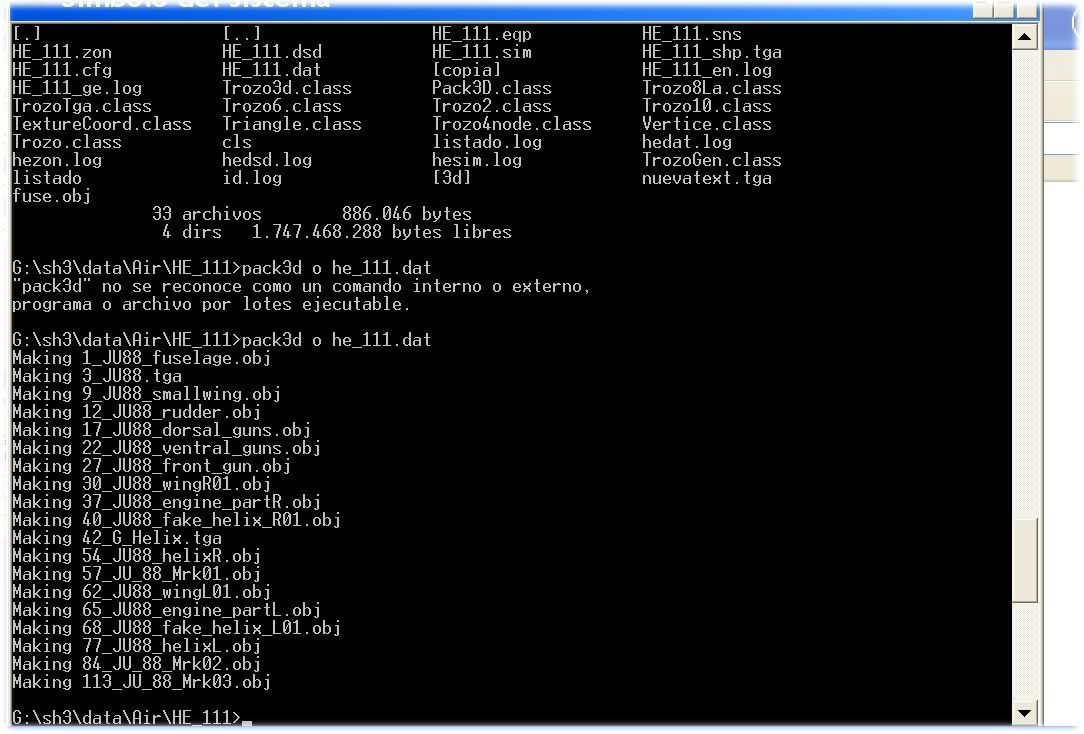
I: Reinsert a TGA in the dat without the actual restriction of size. Now i'm working in a problem with reinyection of .obj It's important that the three or two prefix name tga was in the format 3_new_name.tga and this number are equal as original tga.

L: List, in few seconds, all chunks in the .dat, .sim, .zon, .val with details of name, size and position in the file.

T: List only id of chunks
C: Clone object. The number can be any long
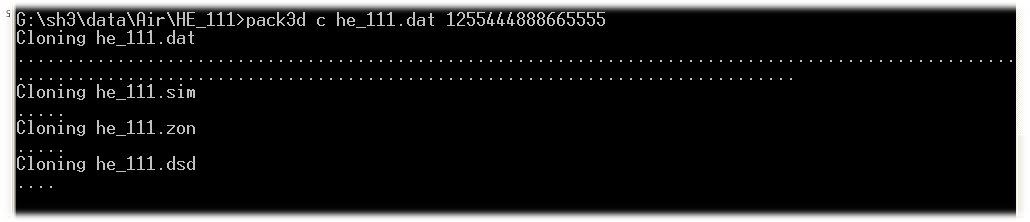
It no have a GUI (windows interface) but i will make it when all functions are finished. For this reason only work in the Console (MS-DOS) of Windows, and the best form to work with object is copy the programa and files in the same directory, sorry about this.
Cheers, |
Original post here: http://www.subsim.com/phpBB/viewtopic.php?t=42918 |
|
| Back to top |
|
 |
stljeffbb1
Joined: 20 Aug 2005
Posts: 171
Location: Wisconsin USA
|
| Posted: Sat Sep 17, 2005 5:19 pm Post subject: |
|
|
This tool that Sansal made is GREAT!!!!!
 \    :sunny:
No more  if you want to clone objects!
Now takes about five minutes when the process used to take at least an hour, sometimes more!
If you want to clone an object to change how basic elements look, it MIGHT be necessary to still clone the "old fashioned" way....I'm trying to modify how a BB Revenge looks using only the data from the Sansal tool, and I will report my findings back to the message boards if and when I have anything to report....I'm still somewhat new to the whole procedure, so it will take me longer than some of the masters of the clone that reside here on the boards!
......However, if you are looking to just clone objects to, say, put different load-outs on them, or assign them different roles,
The Sansal tool is AWESOME!!!!
Just clone, insert in data/air and roster/(country)/air (or change "air" to "sea", or whatever), and you are ready to add to the mission editor!!!

-Jeff |
|
| Back to top |
|
|
Hunterbear
Joined: 21 Apr 2005
Posts: 71
Location: California, USA
|
| Posted: Sat Sep 17, 2005 5:36 pm Post subject: |
|
|
Marvelous work Sansal!
Looking forward to trying it out. Thank you for making it easier for all of us.
|
|
| Back to top |
|
|
Type941
Joined: 17 May 2005
Posts: 1311
Location: U-52
|
| Posted: Sat Sep 17, 2005 7:16 pm Post subject: |
|
|
| I'm gonna look into it. BIG BIG BIG thank you Mister, this is the best breakthrough thus far it seems. Looking forward to seeing more progress on this. \ |
|
| Back to top |
|
|
iambecomelife
Joined: 11 Apr 2005
Posts: 1047
|
| Posted: Sat Sep 17, 2005 7:31 pm Post subject: |
|
|
| Sansal's updated it, so make sure to get the latest version. |
|
| Back to top |
|
|
Sansal
Joined: 15 May 2005
Posts: 150
Location: Spain
|
| Posted: Sat Sep 17, 2005 9:21 pm Post subject: |
|
|
It's a little change. Now it clone .cam and other bug when we import a obj. But there are more work to do.
http://www.savefile.com/files/8997119
Thanks to all testers; Rubini, stljeffbb1, iambecomelife, Jurge, Sergbuto, AG21,....and Lurbz for something incredible; to break the format, and give us her description. |
|
| Back to top |
|
|
sergbuto
Joined: 14 Sep 2002
Posts: 2530
Location: Sweden
|
| Posted: Thu Sep 22, 2005 4:24 pm Post subject: |
|
|
Sansal,
I tested your tool and tried to extract, modify and import back some objects and I see now why there is a problem with textures for reinserted objects.
Both lurbz's DATNavogator and your tool do not extract/write back the full information concerning 3D-object faces. This becomes a problem for objects which use more than one texture plate, such as hull+deck+bridge/superstructure which come together in a single block/combined object for all the ships in SH3.
Here is an extract from the lurbz's description of Type 1: 3D chunk
| Quote: | triangle data: there are ntri triangles and their texture mapping, each one is as follows
vertex1: unsigned 2-byte int
vertex2: unsigned 2-byte int
vertex3: unsigned 2-byte int
texture coord1: unsigned 2-byte int
texture coord2: unsigned 2-byte int
texture coord3: unsigned 2-byte int
????????????: one byte |
The byte with question marks which lurbz could not identify is actually the texture plate number out of those used for the object. Say, usually three textures are used for the hull+deck+bridge object of the SH3 ships, their numbers will be 0,1,2, respectively. The texture number is written in the faces section in the 13-byte step.
This needs to be taken into account in the tool upon extracting/importing objects. It is also important to find the way to take this into account when entirely new object using a few texture plates is imported as a part of the entirely new model, created externaly by some other program. |
|
| Back to top |
|
|
Sansal
Joined: 15 May 2005
Posts: 150
Location: Spain
|
| Posted: Thu Sep 22, 2005 5:39 pm Post subject: |
|
|
Thanks Sergbuto:
I saw this but i don't know how to control it. I'm working with only one texture, the number 0 that is the first tga in the dat (Daly go off ). I think that is the most simple because we can put all textures in only one tga (now we don't have restrictions in the size of the file) but this need remake the uv map to alocate this faces that now work with 1 or 2 number texture.
This is the version that works with this idea. http://rapidshare.de/files/5416649/pack3d_220105.zip.html
You have more experience than me with 3d editors. Do you like test this posible solution? it seems work.
Saludos, |
|
| Back to top |
|
|
Flakwalker
Joined: 07 Aug 2005
Posts: 129
|
| Posted: Thu Sep 22, 2005 6:07 pm Post subject: |
|
|
| It can be used to clone objects and create new ones? |
|
| Back to top |
|
|
Sansal
Joined: 15 May 2005
Posts: 150
Location: Spain
|
| Posted: Fri Sep 23, 2005 2:27 am Post subject: |
|
|
| Flakwalker wrote: | | It can be used to clone objects and create new ones? |
Yes. |
|
| Back to top |
|
|
Kpt. Lehmann
Joined: 25 Jul 2005
Posts: 1665
Location: Texas, USA
|
| Posted: Fri Sep 23, 2005 3:00 am Post subject: |
|
|
Sansal,
Are you able to add water reflections to new objects you create... like the Milk Cow for example? |
|
| Back to top |
|
|
Sansal
Joined: 15 May 2005
Posts: 150
Location: Spain
|
| Posted: Fri Sep 23, 2005 4:21 am Post subject: |
|
|
Yes. You need import the same object 3 times. The objects with reflexion have two more labels with prefix SHD_ and REFLEX_ the 3d obj is the same.
Whe the tool will be finished you can control any property of this unit. Velocity, mass, power, ia....all that i can identify in the files.
Saludos, |
|
| Back to top |
|
|
Kpt. Lehmann
Joined: 25 Jul 2005
Posts: 1665
Location: Texas, USA
|
| Posted: Fri Sep 23, 2005 9:53 am Post subject: |
|
|
What I am wondering is... can you substitute the reflection of the S-Boat to the Type II U-boat to give it a reflection?
It wouldn't be perfect.... but would be better than nothing... which is of course the way it is now. |
|
| Back to top |
|
|
Sansal
Joined: 15 May 2005
Posts: 150
Location: Spain
|
| Posted: Fri Sep 23, 2005 4:13 pm Post subject: |
|
|
This is the result, as any other ship 
 |
|
| Back to top |
|
|
Beery
Joined: 09 Nov 2004
Posts: 2817
Location: Boston, MA, USA
|
| Posted: Fri Sep 23, 2005 4:44 pm Post subject: |
|
|
| Can we get a mod made that gives reflections to all the U-boats that are missing reflections (both hull and conning tower reflections)? This has been one of my pet peeves with the game, so it would be great if we could get something like this into RUb, and I'm sure the other folks with major mods out would be happy to get this finally sorted out. |
|
| Back to top |
|
|
|



