| View previous topic :: View next topic |
| Author |
Message |
Beery
Joined: 09 Nov 2004
Posts: 2817
Location: Boston, MA, USA
|
 Posted: Sat Jul 30, 2005 10:45 pm Post subject: New version of SH3 Commander (1.43) now available! |
 |
|
New version of SH3 Commander now available!
Get it at the Beerymod site (www.beerymod.com) or directly from www.beerymod.com/SH3Cmdr1.43.7z.
Jaesen Jones' new 'SH3 Commander' is once more greatly enhanced, and gives lots more flexibility and depth to the game. Here is a screenshot of the main SH3 Commander interface:
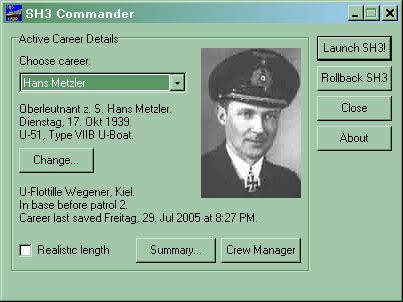
SH3 Commander will generate an in-depth history for your commander, including birthdate, promotions, the date he joined the navy, and the date he transferred to the Ubootwaffe. After your career is over (if your commander survives), it will even generate a biography of your commander's later activities - what he did for the rest of the war, and what happened to him after the war. SH3 Commander creates an entire background story. Your commander becomes a real person with a story that goes beyond the limits of Silent Hunter III.
CREW MANAGER
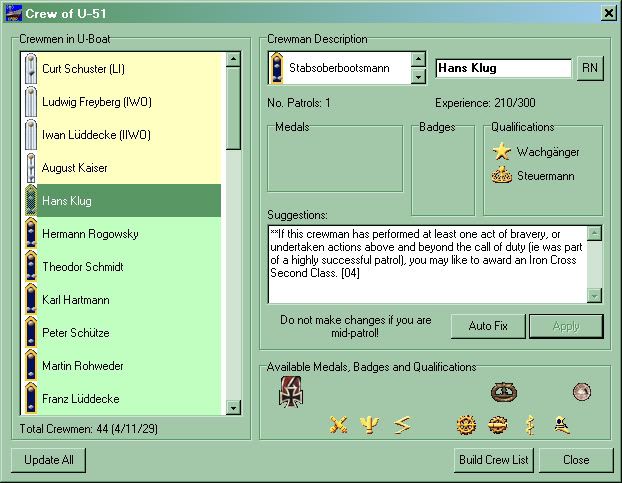
With a simple click on the Crew Manager button, players can:
-promote and demote within type (ie Officers, Petty Officers and Sailors);
-change crewmen names;
-give and remove medals based on historic criteria;
-give and remove badges based on historic criteria;
-give, adjust and remove qualifications;
-create a crew list for viewing (txt file) and printing.
The Crew Manager also warns if certain conditions are met, such as a crewman receiving medals before they are historically available, or if a crewman might be entitled to specific medals etc and allows a "one click" auto fix.
To use the Crew Manager, just select a crewman and click-and-drag medals, promote or demote the crewman by choosing from the ranks in the drop-down list, or click on the RN button to randomize his name. Clicking 'Apply' saves the changes. You can also build a crew list, saving the details of your crew and their accomplishments to a text file.
New features include:
- Added ability to generate Commander name for new careers
- Now sets career (new and existing) in SH3 prior to loading, thus providing more integration with SH3
- "Realistic Length" preference now saved between uses
- Now correctly inserts tonnage information in Career Summary regardless of user's country
- Added ability to print Career Summaries and Crew Lists for dead and retired commanders
- Removed IC2 and Front Clasp from the Auto Fix routine (suggestions are still provided)
- Added realistic U-boat number selection by type and flotilla
- Translations of various features into German for those who play the game in German. Translations by Nico71.
For details of more features, see the help file that comes with the download.
MODS INCLUDED WITH SH3 COMMANDER
- Monthly news reports that appear when loading a patrol, and during the patrol. Text by Beery, translation by Nico71.
- A map of Europe and the Mediterranean which updates based on the progress of the war. Map by Beery.
- Historical radio broadcasts that appear at their correct dates.
- Crush depth mod that gives players an increased crush depth for the Type VIIC/41.
New in version 1.42:
- 1939 flotilla names are included (1st Flotilla is named 'Weddigen', 2nd is 'Saltzwedel' and 7th is 'Wegener').
New in version 1.43:
- Added Random Tonnage Mod by Observer.
- Fuel resupply strategy simulated from April 1942 until December 1943 by extending range of Type VIIC during this time period.
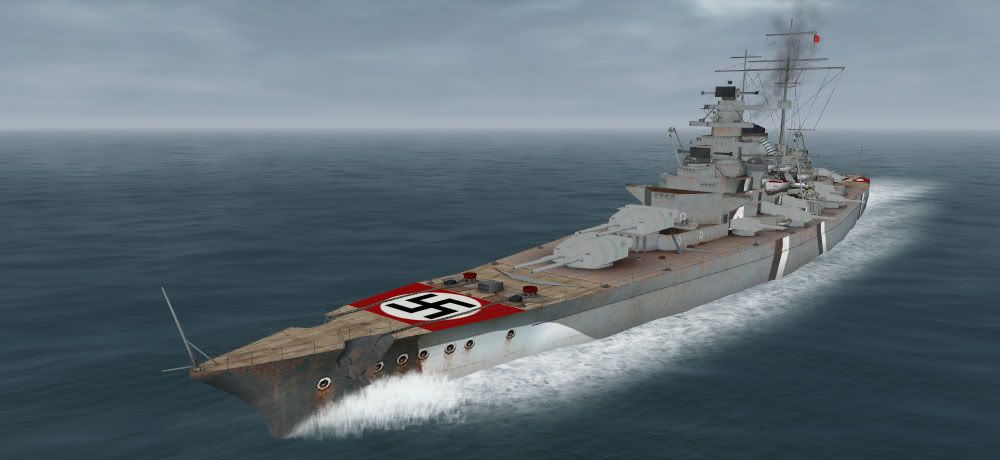
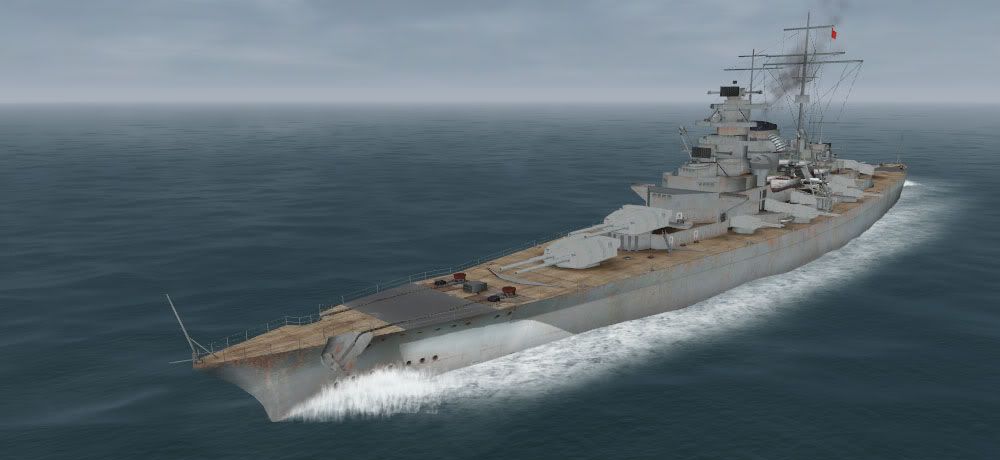
- Bismarck features 3 paint schemes - the sea trials scheme which Bismarck used until March 1941 (scheme by Macstu23), the Operation Rheinubung scheme which was used from March until May 1941 (scheme by Beery), and the final scheme which was used when it sailed into the Atlantic (scheme by Type941).
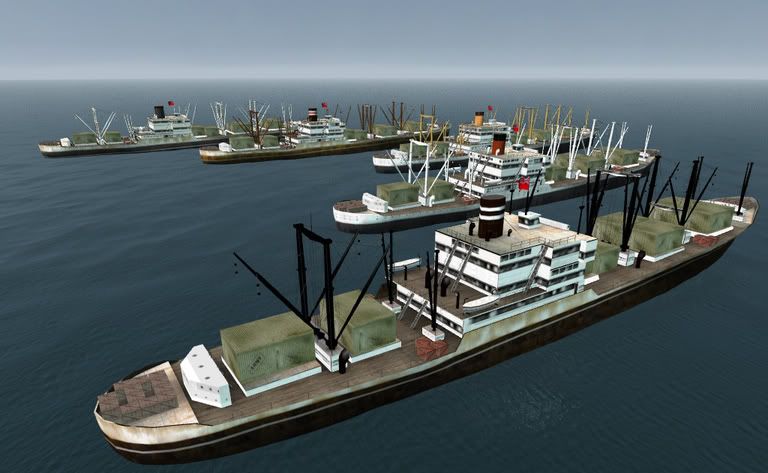
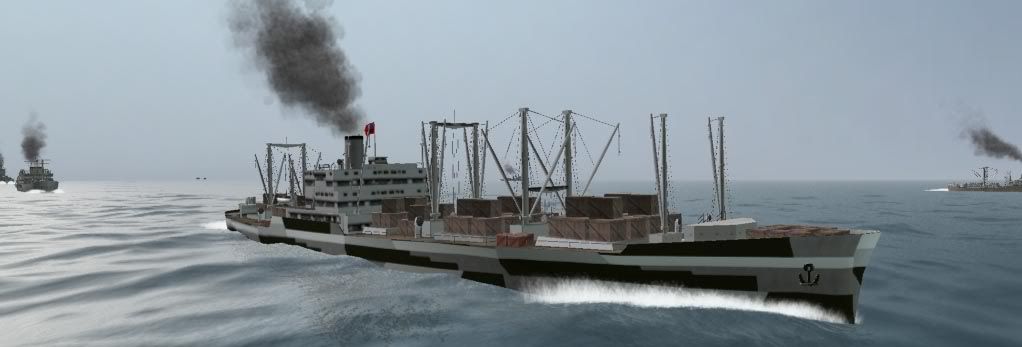
- Merchant Variety Pack by Iambecomelife.
New Bismarck schemes:

Merchant Variety Pack screenshots:
Last edited by Beery on Sat Jul 30, 2005 11:31 pm; edited 1 time in total |
|
| Back to top |
|
 |
terrapin
Joined: 30 Apr 2005
Posts: 815
|
| Posted: Sat Jul 30, 2005 11:00 pm Post subject: |
|
|
Great!  |
|
| Back to top |
|
|
Boba Fett
Joined: 24 Apr 2005
Posts: 6
Location: Gdansk, Poland
|
| Posted: Sun Jul 31, 2005 12:55 am Post subject: |
|
|
Fantastic !
When RU 1.43 ?
 |
|
| Back to top |
|
|
The Avon Lady
Joined: 18 May 2005
Posts: 3267
Location: Jerusalem, Israel
|
| Posted: Sun Jul 31, 2005 1:25 am Post subject: |
|
|
| Any special update instructions, if installing with JSGME? Can we simply uninstall the old version and install the new? Or will data be lost? |
|
| Back to top |
|
|
CCIP
Joined: 17 Apr 2005
Posts: 3224
Location: Ottawa, Canada [Grid BA7311]
|
| Posted: Sun Jul 31, 2005 1:27 am Post subject: |
|
|
| Excellent! And it makes using MVP so much easier now, too |
|
| Back to top |
|
|
foobitt1
Joined: 29 May 2005
Posts: 7
Location: boise,idaho
|
| Posted: Sun Jul 31, 2005 1:34 am Post subject: |
|
|
| Any special update instructions, if installing with JSGME? Can we simply uninstall the old version and install the new? Or will data be lost?......................................yea that???????????? |
|
| Back to top |
|
|
The Avon Lady
Joined: 18 May 2005
Posts: 3267
Location: Jerusalem, Israel
|
| Posted: Sun Jul 31, 2005 1:47 am Post subject: |
|
|
| foobitt1 wrote: | | Any special update instructions, if installing with JSGME? Can we simply uninstall the old version and install the new? Or will data be lost?......................................yea that???????????? |
Looking at the new archive, I see that there's no DAT file. So that means that when uninstalling the old version and installing the new, the old DAT file stays in place.
However, the new version comes with a new INI file named SH3CMDR.ini.new. Does the new version detect this file the first time it is run, delete the old version and then rename this file to SH3CMDR.ini? Or do we manually have to do this our selves? |
|
| Back to top |
|
|
JScones
Joined: 21 Apr 2005
Posts: 1129
Location: Australia
|
| Posted: Sun Jul 31, 2005 1:59 am Post subject: |
|
|
| The Avon Lady wrote: | | Any special update instructions, if installing with JSGME? Can we simply uninstall the old version and install the new? Or will data be lost? |
Simply unpack over the top of your current installation. The installation will not overwrite your SH3Cmdr.ini file, which is where all your career data and name information is stored. SH3 Commander sorts all this out automatically when it is first ran to ensure that you suffer no data loss. Also note that SH3Cmdr.dat is no longer needed - it has been replaced with SH3Cmdr_en.txt and SH3Cmdr_de.txt, the new language files.
Running with JSGME? SH3 Commander is not a mod per se, but a full add-on. There's no need to use in conjunction with JSGME. SH3 Commander has its own copy engine that manages the files it copies into SH3. Using with JSGME is really just wasting hard disk space and effectively putting a "wrapper around a wrapper". But, if that's how you want to run it, the same deal applies, but just disable your current installation of SH3 Commander first. Personally, I just install SH3 Commander to my C:\ drive and create an icon on my desktop. I run it whenever I want to run SH3. I know Beery, however, likes to install straight into his SH3 folder, which is equally as fine. |
|
| Back to top |
|
|
The Avon Lady
Joined: 18 May 2005
Posts: 3267
Location: Jerusalem, Israel
|
| Posted: Sun Jul 31, 2005 2:04 am Post subject: |
|
|
| JScones wrote: | | The Avon Lady wrote: | | Any special update instructions, if installing with JSGME? Can we simply uninstall the old version and install the new? Or will data be lost? |
Simply unpack over the top of your current installation. The installation will not overwrite your SH3Cmdr.ini file, which is where all your career data and name information is stored. SH3 Commander sorts all this out automatically when it is first ran to ensure that you suffer no data loss. Also note that SH3Cmdr.dat is no longer needed - it has been replaced with SH3Cmdr_en.txt and SH3Cmdr_de.txt, the new language files.
Running with JSGME? SH3 Commander is not a mod per se, but a full add-on. There's no need to use in conjunction with JSGME. SH3 Commander has its own copy engine that manages the files it copies into SH3. Using with JSGME is really just wasting hard disk space and effectively putting a "wrapper around a wrapper". But, if that's how you want to run it, the same deal applies, but just disable your current installation of SH3 Commander first. Personally, I just install SH3 Commander to my C:\ drive and create an icon on my desktop. I run it whenever I want to run SH3. I know Beery, however, likes to install straight into his SH3 folder, which is equally as fine. |
All of this should have been in a ReadMe. At least please add it to the thread's 1st post for all to see right away. |
|
| Back to top |
|
|
The Avon Lady
Joined: 18 May 2005
Posts: 3267
Location: Jerusalem, Israel
|
| Posted: Sun Jul 31, 2005 2:10 am Post subject: |
|
|
| JScones wrote: | | I know Beery, however, likes to install straight into his SH3 folder, which is equally as fine. |
So can we simply drag and drop the archived SH3 Commander folder into our SH3 install folder or anywhere else on our hard drive and SH3 Commander will pick up the SH3 execution path from the Windows registry? |
|
| Back to top |
|
|
JScones
Joined: 21 Apr 2005
Posts: 1129
Location: Australia
|
| Posted: Sun Jul 31, 2005 2:23 am Post subject: |
|
|
| The Avon Lady wrote: | | All of this should have been in a ReadMe. At least please add it to the thread's 1st post for all to see right away. |
Well, the readme/help file does state "To install, simply unzip SH3 Commander to a folder of your choice, including the Silent Hunter III install folder if you desire.", which, in simplistic terms, is all that is required (in fact, it was consciously decided not to be too descriptive in order to avoid confusion). However, I take your point and will speak to Beery about making it more specific and informative.
| The Avon Lady wrote: | | So can we simply drag and drop the archived SH3 Commander folder into our SH3 install folder or anywhere else on our hard drive and SH3 Commander will pick up the SH3 execution path from the Windows registry? |
Yup. For example, I have two installs. One under C:\Games\SH3 Commander (my Silent Hunter III installation is C:\Games\SilentHunterIII) and one buried deep in my application development folders. Both access the default installation of SH3 (I believe there may be a problem with multiple installs of SH3, but no-one has been able to yet provide me with the specific details). To make it even easier for myself, I have created a shortcut on my desktop. I just insert the SH3 DVD, doubleclick the shortcut and I'm away!
Apologies for any confusion. |
|
| Back to top |
|
|
The Avon Lady
Joined: 18 May 2005
Posts: 3267
Location: Jerusalem, Israel
|
| Posted: Sun Jul 31, 2005 2:27 am Post subject: |
|
|
Great.
Where does SH3 Commander retain my current player career(s) information? In a file? Where? Or in the registry. Makes a difference how I'll update now that I see that using JSGME is not necessary. |
|
| Back to top |
|
|
HMCS
Joined: 29 May 2005
Posts: 184
|
| Posted: Sun Jul 31, 2005 2:29 am Post subject: |
|
|
Bravo Zulu.
Is it compatible with improved convoys? |
|
| Back to top |
|
|
JScones
Joined: 21 Apr 2005
Posts: 1129
Location: Australia
|
| Posted: Sun Jul 31, 2005 2:45 am Post subject: |
|
|
| The Avon Lady wrote: | | Where does SH3 Commander retain my current player career(s) information? In a file? Where? Or in the registry. Makes a difference how I'll update now that I see that using JSGME is not necessary. |
The SH3Cmdr.ini file in the SH3 Commander folder stores all your career details and SH3 Commander settings (you'll see one of your recent requests has now been included!  ). Essentially most, if not all, users will only want one installation of SH3 Commander (I have two because one is for testing and one is for playing  ).
The SH3Cmdr.ini file is the main file which users can manually adjust. For example, you may like to add more first, last or birth place names.
For info, SH3 Commander makes no changes to the registry, meaning no left over residual should you ever decide to remove it. |
|
| Back to top |
|
|
Egan
Joined: 21 Sep 2001
Posts: 2325
Location: Red Clydeside
|
| Posted: Sun Jul 31, 2005 5:57 am Post subject: |
|
|
| Excellent, lads. Nice one. |
|
| Back to top |
|
|
|
|
You cannot post new topics in this forum
You cannot reply to topics in this forum
You cannot edit your posts in this forum
You cannot delete your posts in this forum
You cannot vote in polls in this forum
|
Powered by phpBB © 2001, 2005 phpBB Group
|



