| View previous topic :: View next topic |
| Author |
Message |
Canaris
Joined: 10 May 2005
Posts: 29
|
 Posted: Sat Oct 01, 2005 2:17 am Post subject: |
 |
|
Looks fine Sansal. 
Hm, because of that "Fun with Wings 3d"-thread i had a look into the Wavefront .obj file format. Their were reported some things about wrong texturemappings. Following:
Wavefront .obj file format uses a different v offset in uvw-maps.
That means obj has the zero-coordinate for v on the opposite of the mapfile than SH3 geometry. Maybe that helps a little bit.
MfG
Canaris |
|
| Back to top |
|
 |
Sansal
Joined: 15 May 2005
Posts: 150
Location: Spain
|
| Posted: Sat Oct 01, 2005 7:09 am Post subject: |
|
|
| Canaris wrote: | Looks fine Sansal.
Hm, because of that "Fun with Wings 3d"-thread i had a look into the Wavefront .obj file format. Their were reported some things about wrong texturemappings. Following:
Wavefront .obj file format uses a different v offset in uvw-maps.
That means obj has the zero-coordinate for v on the opposite of the mapfile than SH3 geometry. Maybe that helps a little bit.
MfG
Canaris |
I don't work before with 3d modelling and i don't know good the obj format. Canaris, do you know how to specify a tga texture in the obj? All that i found in the net don't explain it.
Thanks Canaris, |
|
| Back to top |
|
|
Seeadler
Joined: 14 Mar 2001
Posts: 1992
Location: Germany
|
| Posted: Sat Oct 01, 2005 7:40 am Post subject: |
|
|
Textures informations are stored outside the OBJ file in a material file.
Example:
- A simple cube with a texture sun.tga mapped on all sides.
- You will get two files, the cube.obj and cube.mtl
cube.obj:
| Code: |
# Wavefront OBJ file: H:\Projekte\epro Software GmbH\Testobjekte\cube.obj
# Bounding box of geometry = (-20.9466,0,-23.3042) to (2.77286,21.2039,7.55135).
mtllib cube.mtl
# Coordinates for object 'Box01'
v -20.946615 0.0 7.551350
v 2.772858 0.0 7.551350
v -20.946615 0.0 -23.304178
v 2.772858 0.0 -23.304178
v -20.946615 21.203859 7.551350
v 2.772858 21.203859 7.551350
v -20.946615 21.203859 -23.304178
v 2.772858 21.203859 -23.304178
v -20.946615 0.0 7.551350
v 2.772858 0.0 7.551350
v 2.772858 21.203859 7.551350
v 2.772858 21.203859 7.551350
v -20.946615 21.203859 7.551350
v -20.946615 0.0 7.551350
v 2.772858 0.0 -23.304178
v 2.772858 21.203859 7.551350
v 2.772858 0.0 -23.304178
v -20.946615 0.0 -23.304178
v -20.946615 21.203859 -23.304178
v -20.946615 21.203859 -23.304178
v 2.772858 21.203859 -23.304178
v 2.772858 0.0 -23.304178
v -20.946615 0.0 -23.304178
v -20.946615 21.203859 7.551350
v -20.946615 21.203859 7.551350
v -20.946615 0.0 -23.304178
# 26 vertices
vt 0.0 0.0 0.0
vt 0.0 1.000000 0.0
vt 1.000000 0.0 0.0
vt 1.000000 1.000000 0.0
# 4 texture vertices
vn -1.0 0.0 0.0
vn 0.0 -1.0 0.0
vn 0.0 0.0 -1.0
vn 0.0 0.0 1.0
vn 0.0 1.0 0.0
vn 1.0 0.0 0.0
# 6 normals
usemtl 01___default
o Box01
g Box01
s off
f 1/3/2 3/4/2 4/2/2
f 4/2/2 2/1/2 1/3/2
f 5/1/5 6/3/5 8/4/5
f 8/4/5 7/2/5 5/1/5
f 9/1/4 10/3/4 11/4/4
f 12/4/4 13/2/4 14/1/4
f 2/1/6 15/3/6 8/4/6
f 8/4/6 16/2/6 2/1/6
f 17/1/3 18/3/3 19/4/3
f 20/4/3 21/2/3 22/1/3
f 23/1/1 1/3/1 24/4/1
f 25/4/1 7/2/1 26/1/1
# 12 polygons
|
cube.mtl:
| Code: |
# Wavefront OBJ file: H:\Projekte\epro Software GmbH\Testobjekte\cube.obj
# Bounding box of geometry = (-20.9466,0,-23.3042) to (2.77286,21.2039,7.55135).
newmtl default
Ns 32
d 1
illum 2
Kd 0.4 0.4 0.4
Ks 0.7 0.7 0.7
Ka 0.3 0.3 0.3
newmtl 01___default
Ns 3
d 1
illum 2
Kd 0.588235 0.588235 0.588235
Ks 0 0 0
Ka 0.588235 0.588235 0.588235
map_Kd sun.tga
|
|
|
| Back to top |
|
|
Sansal
Joined: 15 May 2005
Posts: 150
Location: Spain
|
| Posted: Sat Oct 01, 2005 8:02 am Post subject: |
|
|
Many thanks Seeadler
What is Kd Ks Ka in mtl ? Three posible images? |
|
| Back to top |
|
|
Canaris
Joined: 10 May 2005
Posts: 29
|
| Posted: Sat Oct 01, 2005 8:12 am Post subject: |
|
|
Hm, i also didn't use the obj-format, but how the faces are written is very useful for work with SH3-geometry. 
To add a material is very simple:
| Code: |
# Wavefront OBJ file
# header & blabla
mtllib NCL_Dido_boat02.mtl #use a file to specify the materials
g NCL_Dido_boat02 #objectname as group
v 0.000912 0.049299 -0.350204
v 0.000798 -0.063856 -0.287090
v -0.000745 -0.063856 0.282524
v -0.000864 0.049307 0.350204
# and so on
vt 0.860849 0.364295
vt 0.741674 0.314768
vt 0.980788 0.315139
vt 0.958285 0.357868
vt 0.965689 0.412230
# and so on
usemtl normal #specify the material by name(normal) that is used in following faces
f 2/3 3/2 7/1
f 7/1 15/4 2/3
f 8/6 15/4 9/5
f 9/5 1/7 8/6
f 15/4 8/6 2/3
# and so on
usemtl 2sided #specify the material by name(2sided) that is used in following faces
f 31/27 21/26 30/25
f 25/30 9/29 28/28
f 9/29 25/30 1/31
f 14/34 23/33 4/32
f 27/37 29/36 26/35
f 11/39 19/38 27/37
# and so on
|
and the materialfile NCL_Dido_boat02.mtl
| Code: |
# Wavefront material file
# header & blabla
newmtl normal # specify a new material - named normal
Ka 0 0 0 # ambient color - means what colors of ambient light are reflected (rgb)
Kd 0.898039 0.898039 0.898039 # diffuse color - means what colors of diffuse light are reflected (rgb)
Ks 1.000000 1.000000 1.000000 # specular color - - means what colors of specular light are reflected (rgb)
illum 1.000000
Ns 0.003922
map_Kd NCL_Dido.tga # specifys a mapfile for diffuse material
newmtl 2sided # the same procedure as last year
Ka 0 0 0
Kd 0.898039 0.898039 0.898039
Ks 1.000000 1.000000 1.000000
illum 1.000000
Ns 0.000000
map_Kd NCL_Dido.tga
|
What Ns means i don't know. But i hope that helps a little bit.
MfG
Canaris
edit: i should learn to write faster  |
|
| Back to top |
|
|
Seeadler
Joined: 14 Mar 2001
Posts: 1992
Location: Germany
|
| Posted: Sat Oct 01, 2005 8:27 am Post subject: |
|
|
| Sansal wrote: |
What is Kd Ks Ka in mtl ? |
Ka - defines the ambient color of the material to be (r,g,b). The default is (0.2,0.2,0.2);
Kd - defines the diffuse color of the material to be (r,g,b). The default is (0.8,0.8,0. ;
Ks - defines the specular color of the material to be (r,g,b). This color shows up in highlights. The default is (1.0,1.0,1.0);
d - defines the transparency of the material to be alpha. The default is 1.0 (not transparent at all) Some formats use Tr instead of d
Tr - defines the transparency of the material to be alpha. The default is 1.0 (not transparent at all). Some formats use d instead of Tr
Ns - defines the shininess of the material to be s. The default is 0.0
illum - denotes the illumination model used by the material. illum = 1 indicates a flat material with no specular highlights, so the value of Ks is not used. illum = 2 denotes the presence of specular highlights, and so a specification for Ks is required
map_Ka - names a file containing a texture map, which should just be an ASCII dump of RGB values
Reference:
http://www.csit.fsu.edu/~burkardt/data/mtl/mtl.html |
|
| Back to top |
|
|
martes86
Joined: 25 Jun 2004
Posts: 1151
Location: The Colourful Seville - Spain
|
| Posted: Sat Oct 01, 2005 9:22 am Post subject: |
|
|
I'm not professional 3D modeller, and don't use Maya or whatever you use (I use gMax), but wanted to test the new version of Sansal's tool. It's great. You can export the sub's 3D interior too, and do the things in a Windows interface... Someone to try to fix some litlle things?  |
|
| Back to top |
|
|
Sansal
Joined: 15 May 2005
Posts: 150
Location: Spain
|
| Posted: Sat Oct 01, 2005 9:40 am Post subject: |
|
|
Many, many, many thanks Canaris y Seeadler.....all this datas are in the type 2 chunk. Reworking to insert mtl in the export tool 
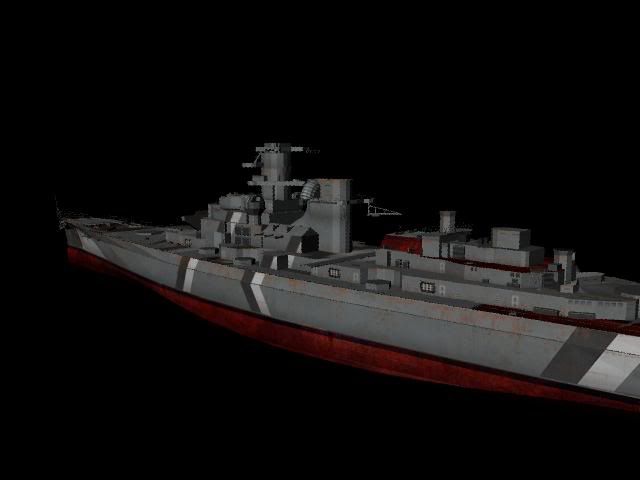
Aaaaaaaaaaaaarrrrrrrrrrrrrrrrrrgggggggggggggg ( The Bismark is sexy )
 |
|
| Back to top |
|
|
Sansal
Joined: 15 May 2005
Posts: 150
Location: Spain
|
| Posted: Mon Oct 03, 2005 7:20 am Post subject: |
|
|
My last version of the tool don't work fine with textures but i guees to upload the solution today or tomorrow.
For questions 1 and 2. There are a new non-commercial version of Maya 7 http://www.alias.com/glb/eng/products-services/product_details.jsp?productId=1900003 whit tutorials for begginers.
3.- You need to activate the objExport plug-in.:Windows->Settings/Preferences -> Pluguin Manager
4.- You need change, with a hexeditor, the position a non-3d node like cfg#M01_NAME_OF_SHIP. If you need one torret more you can change the name of, for example, cfg#A12_NAME_OF_SHIP for cfg#M04_ and add the type of gun in the .eqp file.
Sorry my english. |
|
| Back to top |
|
|
Seeadler
Joined: 14 Mar 2001
Posts: 1992
Location: Germany
|
| Posted: Mon Oct 03, 2005 8:04 am Post subject: |
|
|
Which is the correct internal OBJ format syntax to the import?
I used several 3D tools (3DMax7, Maya 5 PE, Wings3D, DeepExploration) and all outputs different OBJ formats but none of these formats can be imported.
The import tool gives as error message: "java.lang.NumberFormatException: emty String"
Also the new values copied into the OBJ structure produced by Pack3D ends with the this error while import the OBJ file. |
|
| Back to top |
|
|
Commander1980
Joined: 07 Jun 2005
Posts: 216
Location: Germany
|
| Posted: Mon Oct 03, 2005 4:18 pm Post subject: |
|
|
@Sansal or anyone who knows:
How can i get a new set of textures implemented into the dat-file, so that the cloned ship will no longer use the texture of the original ship. WIth pack3d, i does not work, i think...
thx in advance
Edit: it works!
i opened the dat file, changed the name-entries of the original tga and copied a texture-file with the new name in the texture-folder   |
|
| Back to top |
|
|
stljeffbb1
Joined: 20 Aug 2005
Posts: 171
Location: Wisconsin USA
|
| Posted: Mon Oct 03, 2005 8:50 pm Post subject: |
|
|
Commander1980 said:
| Quote: | | changed the name-entries of the original tga and copied a texture-file with the new name in the texture-folder |
That is what I forgot to do! Rushing home to check this now! :8
Thanks Commander1980!
-Jeff |
|
| Back to top |
|
|
Sansal
Joined: 15 May 2005
Posts: 150
Location: Spain
|
| Posted: Mon Oct 03, 2005 9:04 pm Post subject: |
|
|
| Commander1980 wrote: | @Sansal or anyone who knows:
How can i get a new set of textures implemented into the dat-file, so that the cloned ship will no longer use the texture of the original ship. WIth pack3d, i does not work, i think...
|
| Seeadler wrote: | Which is the correct internal OBJ format syntax to the import?
I used several 3D tools (3DMax7, Maya 5 PE, Wings3D, DeepExploration) and all outputs different OBJ formats but none of these formats can be imported.
The import tool gives as error message: "java.lang.NumberFormatException: emty String"
Also the new values copied into the OBJ structure produced by Pack3D ends with the this error while import the OBJ file. |
Prove this version http://rapidshare.de/files/5848151/Pack3D.jar.html (the last for a long time) It need the .mtl with .obj in the same folder and works fine now....THANkS TO YOU AND CANARYS The only one restricction is that this mtl have one texture for planes and two for ships, but this restrictions are imposed by the .dat's. It's posible put more textures with a hexeditor.
The Sergbuto, stljefffbb1, AGP124 and mine testings works for Maya 6 and Wings 3D. DeepExploration don't work because this program changed the indexs of the faces, in the formats that i saw.
If you want see a correct obj, you can to see the .obj that export Pack3D, but there are only v for vertex, vt for uv-map and f for triangles that is the objects that need shiii. |
|
| Back to top |
|
|
Seeadler
Joined: 14 Mar 2001
Posts: 1992
Location: Germany
|
| Posted: Tue Oct 04, 2005 2:25 am Post subject: |
|
|
| Sansal wrote: |
If you want see a correct obj, you can to see the .obj that export Pack3D, but there are only v for vertex, vt for uv-map and f for triangles that is the objects that need shiii. |
I think I've found the error, my 3DSMax7 OBJ export plugin writes two spaces in front of the values instead of one. |
|
| Back to top |
|
|
Sansal
Joined: 15 May 2005
Posts: 150
Location: Spain
|
| Posted: Tue Oct 04, 2005 3:31 am Post subject: |
|
|
The last version solved this, or that was my intention. Works?  |
|
| Back to top |
|
|
|
|
You cannot post new topics in this forum
You cannot reply to topics in this forum
You cannot edit your posts in this forum
You cannot delete your posts in this forum
You cannot vote in polls in this forum
|
Powered by phpBB © 2001, 2005 phpBB Group
|



