| View previous topic :: View next topic |
| Author |
Message |
hachiman
Joined: 25 Dec 2001
Posts: 722
Location: Edinburgh Jockland
|
 Posted: Mon Mar 21, 2005 10:33 am Post subject: Step by Step Manual TDC Tutorial |
 |
|
Is there or can someone make a manual Targetting Tutorial taking us through the step by step process preferably with Screenshots?
Would be very very much appreciated. |
|
| Back to top |
|
 |
Drebbel
Joined: 10 Jan 2002
Posts: 6153
Location: Almost at periscope death !
|
| Posted: Mon Mar 21, 2005 10:33 am Post subject: |
|
|
| The Onkel is working on it. But you will have to wait atleast a week for that. |
|
| Back to top |
|
|
hachiman
Joined: 25 Dec 2001
Posts: 722
Location: Edinburgh Jockland
|
| Posted: Mon Mar 21, 2005 10:34 am Post subject: |
|
|
| Thats gonna be the ultimate sticky. |
|
| Back to top |
|
|
Redwine
Joined: 10 Jan 2002
Posts: 1143
Location: Buenos Aires , Argentina.
|
| Posted: Mon Mar 21, 2005 11:40 am Post subject: |
|
|
Good idea......
I have not the game yet.......( and due to the problems of some people may be i will not buy it).... if not sure i was working in a step by step tutorial, for manual TDC.
If you perform Manual TDC in SH2, you have all the skill you need, in knows, maths etc.......the only diference is in SH3 we need to input a good quality AOB, this demmand a new little step and skill more........ and know how to use the new feature .. the notepad, but it is not needed, you only needs a piece of paper, a pen and a calculator.
Looking the screen shots, periscope reticle is a little bit unaccurate for long range shots, but it is historical accurate, may be we need to decline the hability to perform long range shots.
Best regards, Red. |
|
| Back to top |
|
|
hachiman
Joined: 25 Dec 2001
Posts: 722
Location: Edinburgh Jockland
|
| Posted: Mon Mar 21, 2005 12:19 pm Post subject: |
|
|
| Any chance of someone making this up before Neal(No Offence)? |
|
| Back to top |
|
|
Buggins
Joined: 10 Mar 2005
Posts: 32
|
| Posted: Mon Mar 21, 2005 5:58 pm Post subject: |
|
|
Ok.. Here's my idea of how it works in basic stages. If I'm doing it wrong (which would establish why I'm missing.  ) or have missed anything out I'm sure one of the whiz kids here can correct me. I've only just started a campaign with manual TDC now, having been experimenting with the auto setup for the first weekend -
STEP 1
First identify your target. It would help to lock your periscope/uzo view onto the ship now as well.
You need to know what kind of ship you are targetting so you have a height to work out the range from. Fortunately you don't need to do the trig in your head. When you're satisfied you have the right ship tick the empty box at the bottom of the ship id page. My pointer is hovering over it in this example shot.
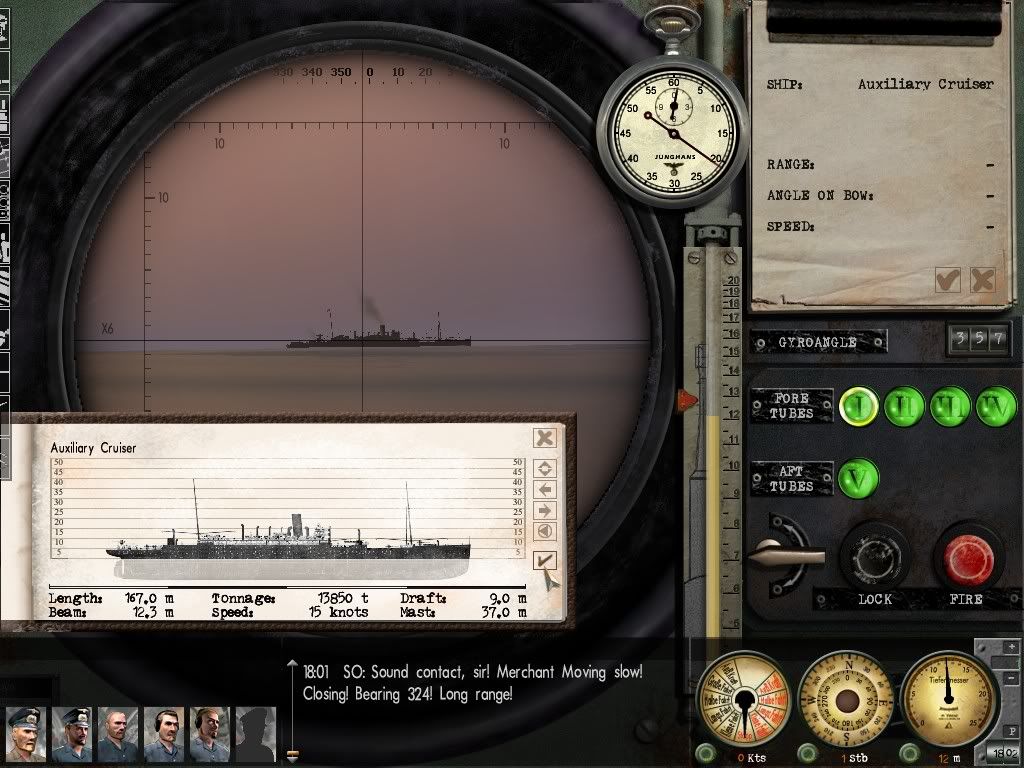
STEP 2
Now on the notepad in the top right click the word 'range'. You should get a screen like the one below but with only one black line on the periscope viewfinder.
Place the bottom line on the waterline of the ship and click the symbol in the bottom left corner of the notepad. The mouse will now move a second line up and down the viewfinder. Move that until it's on the tip of the masts. This is challenging in heavy seas!
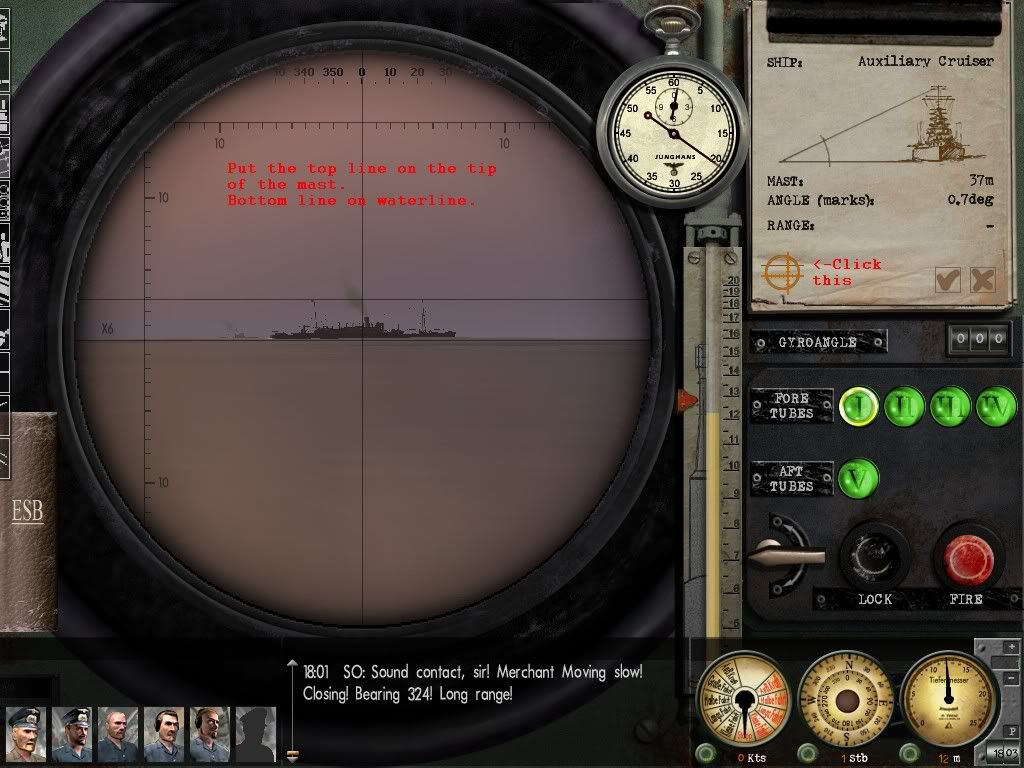
When you're happy that you have that right, click the tick box to go back to the main screen. It should look exactly like screen 1 but the range should now be filled in on the notepad.
STEP 3
Now click the bit of the notepad where it says Angle On Bow and you should get this screen here -

Still with me? Good, now I believe that thing in the circle on the notepad is the enemy ship, not you. So approximate what angle you're at to the ship as best you can. I can't give much advice here but to check your map and practice. When you have it right click the check box.
STEP 4
Speed. Ok this bit is pretty reliant on getting the angle and distance right but basically what you're doing is measuring, through the many wonders of maths, how long it takes the target ship to travel a known amount of distance.
No picture here but all you do is click the heading for speed on our old friend the notepad and then click the stopwatch that appears in the bottom left corner. Let it run for a bit then click it again and you should have your speed. The longer you let it run the better, but of course you may be low in time or have the pressure of an angry destroyer bearing down upon you so don't get carried away!
Lastly click the check box, look at your accumulated results, hit the check the box again and you're done.
All that remains is for you to profit from all that hard work with spectacular successes like this! -

Last edited by Buggins on Mon Mar 21, 2005 6:13 pm; edited 1 time in total |
|
| Back to top |
|
|
dbunger
Joined: 14 Dec 2004
Posts: 7
Location: Seattle
|
| Posted: Mon Mar 21, 2005 6:10 pm Post subject: |
|
|
Nice  Thx |
|
| Back to top |
|
|
hachiman
Joined: 25 Dec 2001
Posts: 722
Location: Edinburgh Jockland
|
| Posted: Tue Mar 22, 2005 8:48 am Post subject: |
|
|
Thanx for this.
Nicely done. 
Just noticed this today so sorry for delay in replying.
Make this a Sticky!! |
|
| Back to top |
|
|
McBeck
Joined: 23 Feb 2001
Posts: 1660
Location: Denmark
|
| Posted: Tue Mar 22, 2005 8:50 am Post subject: |
|
|
| Included in the FAQ sticky. |
|
| Back to top |
|
|
Catfish
Joined: 21 Sep 2001
Posts: 1248
Location: where the ocean meets the sky
|
| Posted: Tue Mar 22, 2005 10:23 am Post subject: |
|
|
Hello,
i've got some problems with Nr. 3...
OK, the silhouette in the middle is the target. Adjusting the blue circle represents the angle at which you look at the target - in relation to your boat, where your bow is 0/360 degrees, the stern 180 etc.
Looking through the UZO or Persiscope i have the relative angle at which I look at the ship. Determining the angle on the bow i have to add 180 degrees to get the AOB seen from the target - which i need.
When i enter this solution in full realism, the bow torpedo will always miss somewhere behind the target. The stern torpedo will shoot straight and not even head towards the target. Hm.
And which angle is the one you can can guess, e.g. where we have the silhouttes of the target in front, 45 degrees, and side. This should determine the enemy's course - but in this TDC emulation, you would not need this, because only the angle is needed - like in the US version of the TDC.
I do not see how to follow four targets at a time and keep their solutions up to date automatically, like it should be done with the electro-mechanical Torpedo-computer.
Greetings,
Catfish |
|
| Back to top |
|
|
Deimos01
Joined: 21 Feb 2005
Posts: 228
Location: St louis
|
| Posted: Tue Mar 22, 2005 10:36 am Post subject: |
|
|
Sounds like you got number 3 backwards. When calculating Angle on the Bow (AOB) you are trying to figure your bearing relative to the target. On the notepad the silhoutte in the middle is the target while the purple circle represents your boat. So for example, if you are directly abeam of your target, or at 90 deg AOB, you would put that purple circle on the 90 deg mark on either the left or right side depending on which side of your target you are on.
As far as shooting multiple targets in a convoy situation. You can figure that all the ships will be moving at the same speed and course. Once you have a firing solution on one ship then alls you have to do for subsequent targets is get range. The TDC will automatically refigure AOB based on the position of your optics. |
|
| Back to top |
|
|
Hudsonhawk
Joined: 08 Mar 2005
Posts: 197
Location: Staten Island,New York
|
| Posted: Tue Mar 22, 2005 10:40 am Post subject: |
|
|
| WoW.......GREAT JOB!!!!!!!! |
|
| Back to top |
|
|
Barkhorn1x
Joined: 30 Apr 2002
Posts: 94
Location: Davie, FL
|
| Posted: Tue Mar 22, 2005 11:35 am Post subject: |
|
|
This is good info., but I have a issue.
When I measure speed - for about 45 seconds to 1 minute - I get results of 1 to 2 knots. Now I know this is too slow as I am running the Torp. traininging mission and Casual Target settings were giving me 4 to 5 knots.
Am I measuring for too short a period. BTW, my range and AOB settings appear to be pretty good.
Thanks,
Barkhorn. |
|
| Back to top |
|
|
Buggins
Joined: 10 Mar 2005
Posts: 32
|
| Posted: Tue Mar 22, 2005 12:24 pm Post subject: |
|
|
If anything I'd say you were spending too long measuring the time! I usually spend about 10 - 15 seconds or so!
It's also important to be still when you're doing the measurement. Bear in mind that what it's doing is measuring the time it takes for the ship to traverse a certain number of degrees in relation to you. Because you know the distance as well as the number of degrees of change it can work out how far the ship has travelled in the time you measured and thus the speed.
I'm still experimenting and new to this myself of course but I'm getting more believable and consistent results as well as results that match closer to my WO's solutions.
To start with I'd work out your solution and then ask the WO to do one and see how different they are. When you're agreeing more or less most of the time you're doing good! |
|
| Back to top |
|
|
Barkhorn1x
Joined: 30 Apr 2002
Posts: 94
Location: Davie, FL
|
| Posted: Tue Mar 22, 2005 12:31 pm Post subject: |
|
|
| Buggins wrote: |
To start with I'd work out your solution and then ask the WO to do one and see how different they are. When you're agreeing more or less most of the time you're doing good! |
Now there's an idea worth considering.
Barkhorn. |
|
| Back to top |
|
|
|



