| View previous topic :: View next topic |
| Author |
Message |
finchOU
Joined: 27 Jan 2004
Posts: 486
|
 Posted: Wed May 04, 2005 12:03 pm Post subject: |
 |
|
wish they implented this in the game....a digital moboard with a mirror line draging to center would be awesome. bascially, to use the moboard effetively (more acurately anyway) you need a set of parallel rulers...which I dont have at the moment. and a good compass.  |
|
| Back to top |
|
 |
wazoo
Joined: 27 Jan 2005
Posts: 247
Location: Tustin, California
|
| Posted: Wed May 04, 2005 12:06 pm Post subject: Large Version of Mod |
|
|
Hey all,
I just posted a larger version of the mod and it makes a HUGE (pun intended) difference! It is now VERY easy to get and read values:
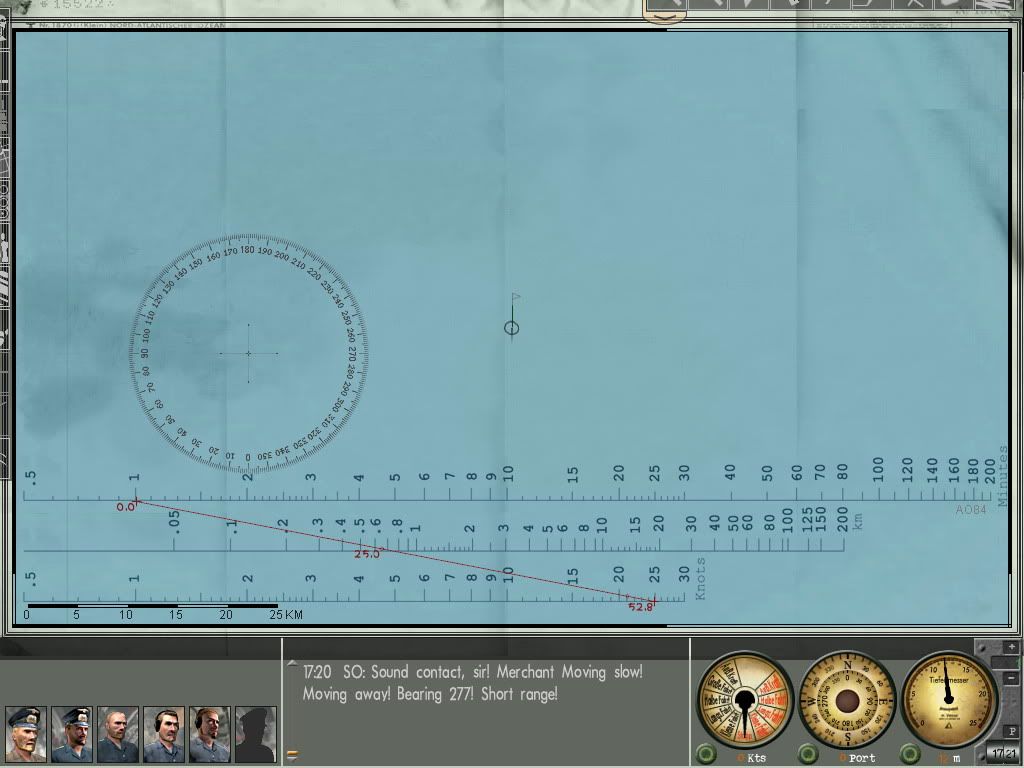
Adds a bit more screen clutter.... but I find this tool useful enough to deal with that negative.
Also... if someone knows how to get rid of that SCALE graphic in the bottom left corner, I could lower the graphic down even further.
Here's the larger version:
http://www.paulwasserman.net/SHIII/WazooNomoModBig.zip
Wazoo |
|
| Back to top |
|
|
wazoo
Joined: 27 Jan 2005
Posts: 247
Location: Tustin, California
|
| Posted: Wed May 04, 2005 12:11 pm Post subject: |
|
|
| jimmie wrote: | | wazoo wrote: | | jimmie wrote: | Do you think you can make it in original resolution?
It may work if you work with current streched version and then resize it to the original, odd resolution (and the game will strech when ran). That should save the size of file.
|
I'm not sure to what you are referring. What "may work"??
Wazoo |
Sorry I should have been clearer. I'm not sure how you found out the res: 1024 * 656 will fit perfectly, and the original file res is 1024 * 512... (am I correct?) I wanted "no dirty version" of this great slide rule, and possibly with a compass on the left bottom, I modified the file myself. That's when I realized the size and the res of the file. Trying to save the file size, I made a clean version of slide rule from your work and resized the file. What I got was that the file is streched vertically in the game, the lines were blurred. Yes, that's kind of expected but I wasn't for putting more effort myself to make the graphics clear when it is streched... It's not exactly 656 (pixel in height) isn't it? |
Ah... okay... gotcha.
Here's the problem:
You are correct. The original file size is 1024x512. However, when I added my Adobe Illustrator image to the original file (after removing the compass rose for clarity), and then went into the game, the nomograph looked HORRIBLE. I later figured out that is because although the source image is 1024x512, based upon the Maps.cfg file, SHIII scales it up to 1024x656.
So to make the nomograph look sharp, I modded the original file to 1024x656 and then cropped and copied to fill in the black bands created from expanding the original.
Thus, it no longer has to scale the image up as it is in native res.
If you want, I can send you the original Adobe Illustrator file of the nomograph so you can mess with it all you want.
Wazoo |
|
| Back to top |
|
|
Seaboy
Joined: 14 Apr 2005
Posts: 290
Location: nill
|
| Posted: Wed May 04, 2005 12:21 pm Post subject: |
|
|
| wazoo rocks! |
|
| Back to top |
|
|
jimmie
Joined: 07 Apr 2005
Posts: 164
|
| Posted: Wed May 04, 2005 12:30 pm Post subject: |
|
|
Thank you Wazoo, with your bigger version, I think I can work myself with raster graphics (I don't have vector handling software installed on my machine now anyway...)
I tweaked the file in PaintShopPro ver 7... which in my opinion is a bit lack in "quality" when precision is important if you compare to photoshop... but since I'm not a pro and can't stand the loading time of photoshop usually I use PSP anyhow...
The thing is, the image (especially the horizontal line) is not blurred when I "compressed" your file to 1024*656. But the line is blurred in the game. So I wasn't sure if it was exactly 656 pixel. Maybe PSP thing...
Thank you very much anyway. Yeah, it adds some clutter to the map but it's indispensable 
lurker_hlb3,
Yes it's yards and miles and if I am to make one myself, I would ask Wazoo for an illustrator vector file  What I want is maybe made of plastic or something duarable, some pro look thingy :know: |
|
| Back to top |
|
|
Jace11
Joined: 16 Mar 2005
Posts: 1091
|
| Posted: Wed May 04, 2005 1:00 pm Post subject: |
|
|
| kaa wrote: | | Jace11 wrote: | | you could have it vertically and maybe more detail. also make it draggable to move it out the way when your not using it.. |
i don't think that it could be made draggable... there were some experiments with compass roses n stuff but without much success i think. but alligning it vertically seems to be a good idea imho.  |
i saw a draggable rose nearly a month ago |
|
| Back to top |
|
|
wazoo
Joined: 27 Jan 2005
Posts: 247
Location: Tustin, California
|
| Posted: Wed May 04, 2005 1:19 pm Post subject: |
|
|
| Jace11 wrote: | | kaa wrote: | | Jace11 wrote: | | you could have it vertically and maybe more detail. also make it draggable to move it out the way when your not using it.. |
i don't think that it could be made draggable... there were some experiments with compass roses n stuff but without much success i think. but alligning it vertically seems to be a good idea imho. |
i saw a draggable rose nearly a month ago |
Really?!? That would be great for this!
Any idea where this was discussed??
Wazoo |
|
| Back to top |
|
|
Castorp24
Joined: 03 Apr 2005
Posts: 68
Location: Spain
|
| Posted: Wed May 04, 2005 1:56 pm Post subject: |
|
|
It´s just a great mod, thanks a lot
About ideas... what about doing it a sliding tool, you know, like the shortcuts menu and things like that? ... don´t ask me how to do it... I wouldn´t be able to...
Anyway, thanks again |
|
| Back to top |
|
|
RickC Sniper
Joined: 11 Jan 2001
Posts: 315
Location: Colorado
|
| Posted: Wed May 04, 2005 1:58 pm Post subject: |
|
|
Great tool !
Thank you.
|
|
| Back to top |
|
|
wazoo
Joined: 27 Jan 2005
Posts: 247
Location: Tustin, California
|
| Posted: Wed May 04, 2005 3:02 pm Post subject: |
|
|
| kaa wrote: |
| Wazoo wrote: | | The inability to zoom is admittedly the biggest drawback |
nah. it isn't. why would you want to zoom the nomograph anyway? it would be illegible on lower zoom levels - like the bearing tool.
| Wazoo wrote: | | First, I made it horizontal so it would be less intrusive (IMHO at least), and, due to the oddities of resolution, give me what I thought to be the highest resolution. That being said, I would be more than happy to quickly whip up a vertical version if people think it would be useful. Should it be oriented on the left or right side of the screen? |
i would like to give the vertical version a try. as i imagine it would be less obtrusive as the screen's horizontal resolution is bigger so we would have more room to plot stuff... but can't be sure till i see it
i think that it should be placed on the right side so as not to interfere with the map scale thing and the side bar menu. |
Since I tried the larger version I recently posted, I agree that zooming would not add anythig....
As for the vertical, I'll give it a shot and see how people like it.
Wazoo |
|
| Back to top |
|
|
wazoo
Joined: 27 Jan 2005
Posts: 247
Location: Tustin, California
|
| Posted: Wed May 04, 2005 3:38 pm Post subject: |
|
|
Well.... here's the vertical version:

I had to reduce it to 41.5% of its native res to get it to fit, which makes it harder to manipulate and read accurately. By way of comparison, the "original" horizontal nomograph is 50% and the newer, larger one is 70%.
Here's a link for those who are interested (switched to a rar format as it is much more efficient than zip):
http://www.paulwasserman.net/SHIII/WazooNomoVert.rar
Curious what others think....
Wazoo |
|
| Back to top |
|
|
wazoo
Joined: 27 Jan 2005
Posts: 247
Location: Tustin, California
|
| Posted: Wed May 04, 2005 4:00 pm Post subject: |
|
|
| kaa wrote: | | not bad... but it's a bit to far to the right. just a few pixels. :hmm: |
Geez! Tough crowd!
Fixed!
Just re-download from the above link and let me know....
Wazoo |
|
| Back to top |
|
|
jimmie
Joined: 07 Apr 2005
Posts: 164
|
| Posted: Wed May 04, 2005 4:07 pm Post subject: |
|
|
| I know I'm being really nit picky ;-p but believe me, this is one of the greatest invention in this 2 months So, being nit-picky, for the vertical version, how about "cutting" less than 1 min, 1 knt, and about less than 300m where it's almost useless practcally. And then it is possible to zoom a liiiiiiiitle bit, isn't it? |
|
| Back to top |
|
|
wazoo
Joined: 27 Jan 2005
Posts: 247
Location: Tustin, California
|
| Posted: Wed May 04, 2005 4:30 pm Post subject: |
|
|
| jimmie wrote: | | I know I'm being really nit picky ;-p but believe me, this is one of the greatest invention in this 2 months So, being nit-picky, for the vertical version, how about "cutting" less than 1 min, 1 knt, and about less than 300m where it's almost useless practcally. And then it is possible to zoom a liiiiiiiitle bit, isn't it? |
The scale is dictated by the longest axis.... thus it is the time line that sets the upper limits. So assuming 1 minutes is the smallest increment we would want, I'll whip up something quickly and see if it enhances significantly the size of the vertical version.
I'm thinking 20% bigger if we are lucky....
I'll be back....
Wazoo |
|
| Back to top |
|
|
Beltza
Joined: 01 Feb 2003
Posts: 361
Location: España
|
| Posted: Wed May 04, 2005 5:01 pm Post subject: |
|
|
An incredible tool!  .
Is simple: the best :know:
Thanks |
|
| Back to top |
|
|
|
|
You cannot post new topics in this forum
You cannot reply to topics in this forum
You cannot edit your posts in this forum
You cannot delete your posts in this forum
You cannot vote in polls in this forum
|
Powered by phpBB © 2001, 2005 phpBB Group
|



